Worker Calculation Variables
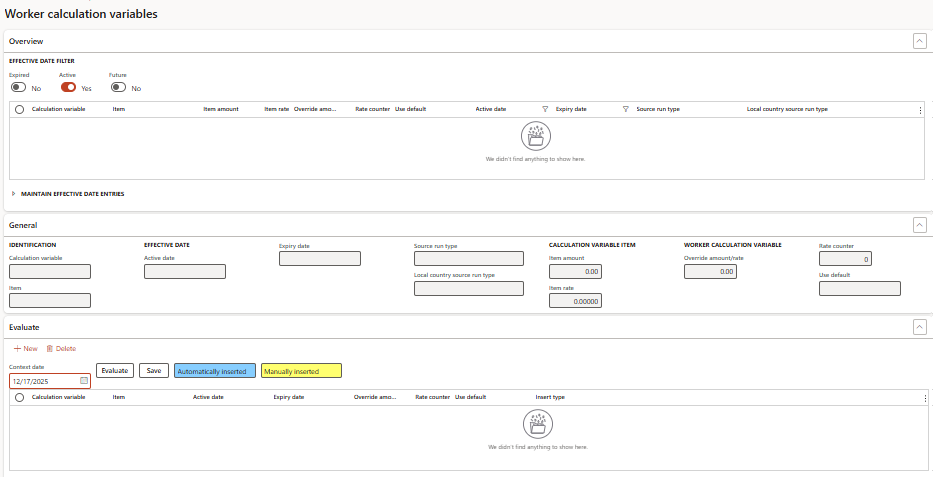
Accessed from:
- Common > Anthology Payroll workers list > worker > AthPay Profile tab > Manage section > Calculation Variables
Description
Worker calculation variables are worker-specific values used in the worker's calculations for their benefit/deductions. For example, number of dependents or personal exemptions.
Calculation variables can be assigned at the worker level or the position level. This form is for calculation variables assigned at the worker level.
Each worker may have a different set of calculation variables with different values.
Additional Tabs
| Tab | Tab Functions |
|---|---|
| Evaluate |
|
| Fast entry |
|
Fields
| Field | Description |
|---|---|
| Calculation variable | Name of the calculation variable assigned to the worker |
| Item | Name of the calculation variable item assigned to the worker. Each item represents a category for the calculation variable (e.g., Married, Single, etc.). |
| Item amount | Default flat amount of item |
| Item rate | Default item rate. This is multiplied against the Rate counter to produce the variable's value. |
| Override amount/rate | Manually entered amount or rate to be used for this worker instead of defaults |
| Rate counter | Multiplier for Item rate (e.g., number of dependents) |
| Use default | Yes to use default values. No to use Override amount/rate. |
| Active date | First date the record is in effect |
| Expiry date | Last date the record is in effect |
| Source run type | Internal Anthology Payroll process used to create the record. Read-only. |
