Calculation Variable Items Setup
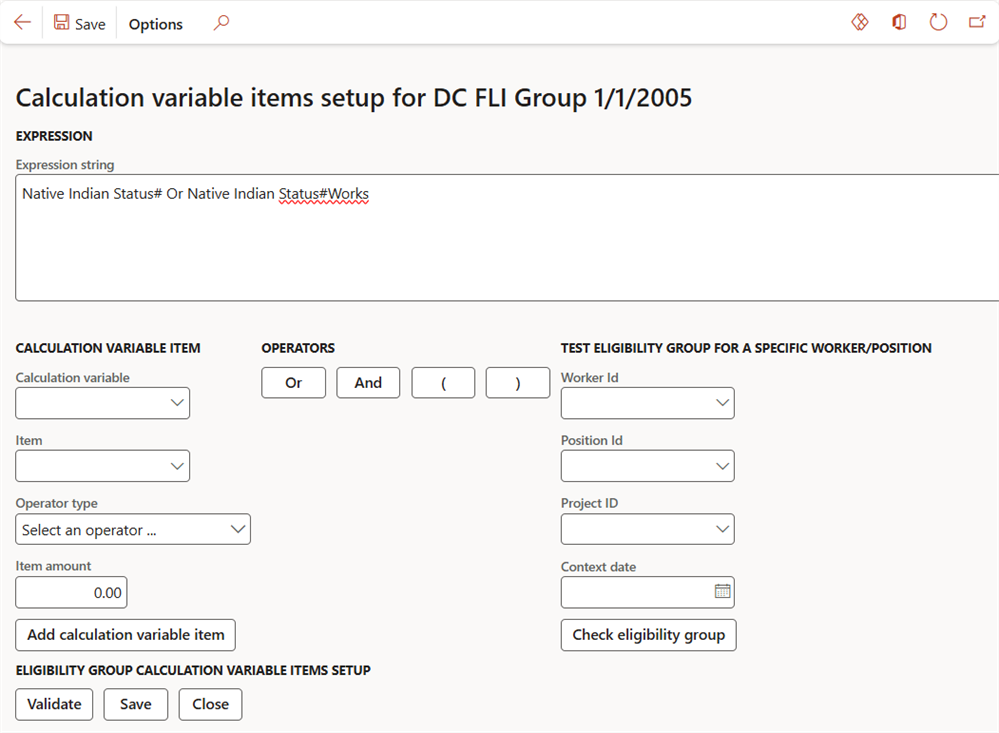
Accessed from:
- Setup > Tables > Eligibilities > Eligibility groups > eligibility group > Calculation variable items tab > Edit
Description
This form is where you define the Expression string for a single eligibility group. The string defines the calculation variable conditions that workers must meet to be considered eligible for the eligibility group.
The expression string must follow strict syntax rules. The form contains functions to test and validate your expression string.
Fields
| Section | Field | Description |
|---|---|---|
| Expression | Expression string | Condition clause that defines the expression's value. All calculation variables, items, and operators are added to this field. This field is validated when selecting the Validate button. |
| Calculation variable item | Calculation variable | Select a calculation variable to add to the expression string |
| Item | Select a calculation variable item to add to the expression string | |
| Operator type |
Operation to use in the condition clause:
|
|
| Item amount | Numeric value to use in the condition clause of the calculation variable item. Select Add calculation variable item to add the specified calculation variable, item, operator and amount to the Expression string. | |
| Operators | Or | Logical disjunction operator for use with multiple calculation variable items |
| And | Logical conjunction operator for use with multiple calculation variable items | |
| ( ) | Parentheses for order of operations | |
| Test eligibility group for a specific worker/position | Worker Id | Select a worker to test their eligibility against the expression string. Requires calculation variables to be assigned to the worker. |
| Position Id | Select the worker's position to test its eligibility against the expression string. Requires calculation variables to be assigned to the worker position. | |
| Project Id | Select a project to test its eligibility against the expression string. Requires calculation variables to be assigned to the project. | |
| Context date | Enter a date to use as the current date in the eligibility test | |
| Eligibility group calculation variable items setup | Validate | Perform syntax validation on the Expression string. If the string has invalid syntax, a pop-up alert appears. |
| Save | Save your changes to the Expression string |
|
| Close | Close the form. Does not automatically save changes to the Expression string. |
