Encryption Keys
The Settings tab has a link to the Mailbox Manager encryption keys. Managing encryption keys for Mailbox Manager requires the following permissions:
- Can Manage Encryption Keys
- Can Manage Application Configuration
Anthology Inc. will only activate one public key at a time and will capture activity history on changes made (i.e., new uploads, inactivation of key, successful uploads, failed uploads).
The public/private key configuration supports file import, file export, and message download.
A user with appropriate permissions, can complete the following steps to manage the encryption key pairs in Mailbox Manager.
-
Select Settings in the navigation bar and select Manage Encryption Keys.
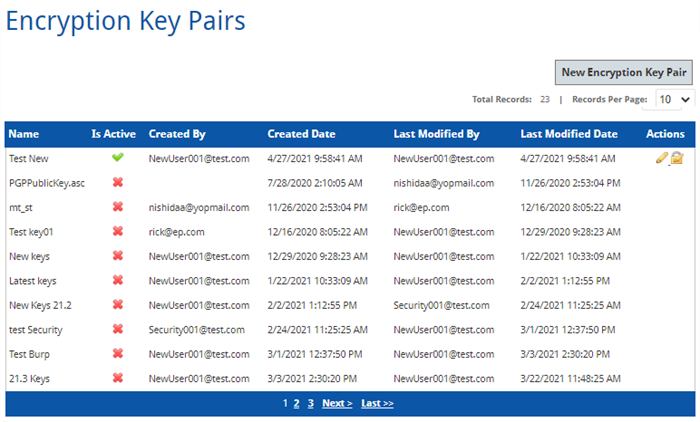
A summary of the available key pairs includes the following:
Column Name Description Name Key Pair Name Is Active A green check mark indicates the key pair is Active.
A red x indicates the key pair is Inactive.
Created By The username associated with the creation of the key pair Created Date The date the key pair was created. Last Modified By The username associated with the last modified action Last Modified Date The date the key pair was last modified. Actions The pencil icon is used to edit the key pair.
The lock icon is used to download the key pair
-
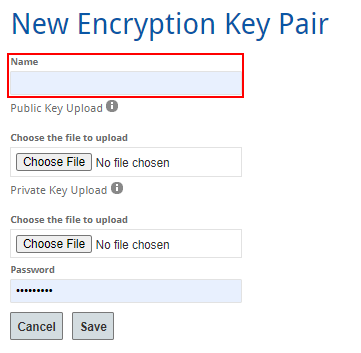
Enter the Name for the new key pair.
-
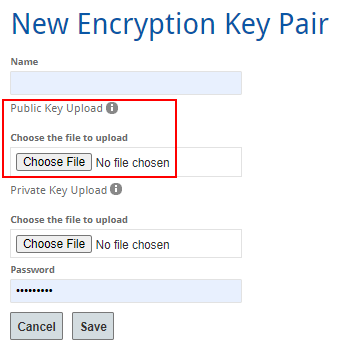
Upload the Public Key. The public key is used for encryption.
-
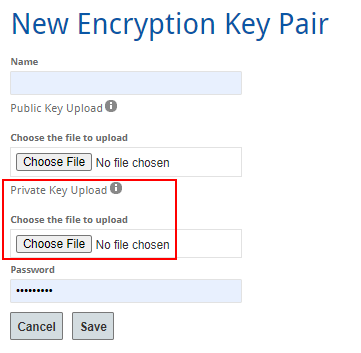
Upload the Private Key. The private key is used for decryption.
-
(Optional) Enter the Password if a password is associated with the key pair.
-
Select Save.
