Workflow Tracking DB Cleanup
If you are using the Workflow Tracking database, you may find that it grows at a rapid pace depending on the configured tracking level.
Version 26.0 adds a new productized cleanup process to help manage the rapid growth of the Workflow Tracking database. This reduces manual effort and ensures consistent database cleanup.
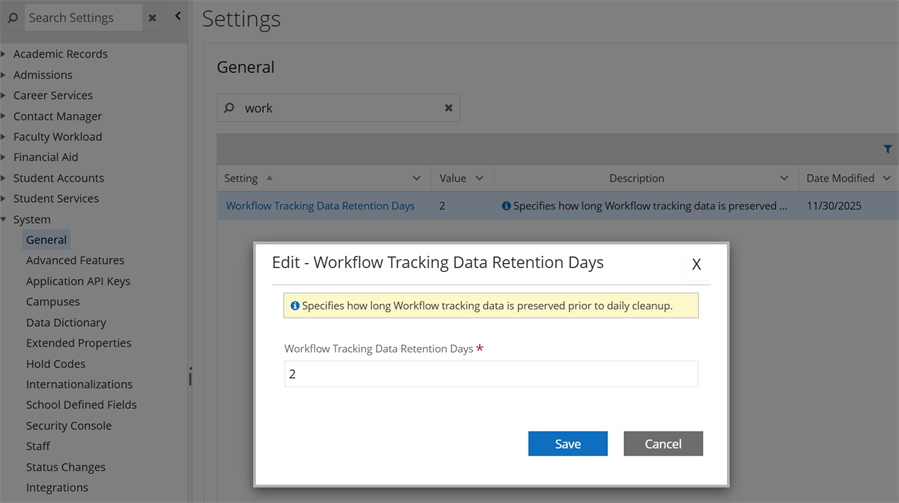
The manual stored procedure is located in Anthology Student under Settings > System > General > Workflow Tracking Data Retention Days. By default, the procedure is configured to retain data for 2 days. The value is configurable.
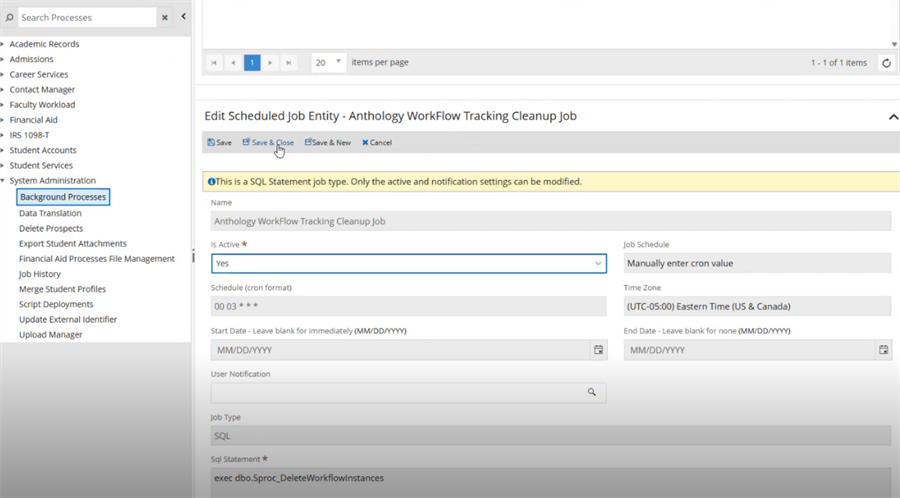
A daily SQL/Hangfire job runs at 3 AM to purge older workflow tracking data.
The cleanup job is not active by default. To activate it, select Processes > System Administration > Background Processes, locate the Anthology Workflow Tracking Cleanup Job on the Schedule tab, and configure the job to Active.
Workflow Tracking DB Cleanup Schript for Previous Versions
In previous releases, the attached script can be run against the tracking database to clean out records on a regular basis. The steps below describe the parameter that needs to be entered and what is needed to schedule it as an SQL job.

-
Use the script sproc_WorkFlowTracking_Delete_Tables_DateParameter.sql. Download or copy it below.
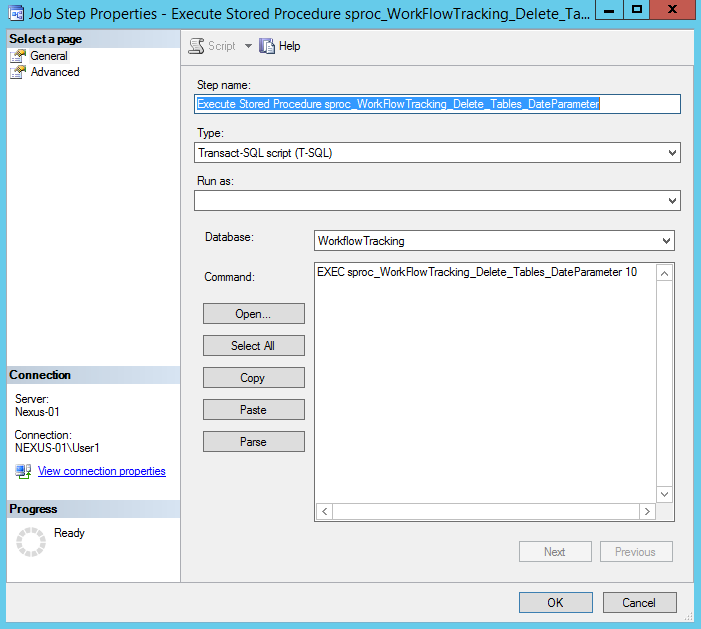
The script only requires a date parameter to be populated. In the scenario below, anything older than 10 days would be deleted.
IF EXISTS (SELECT * FROM INFORMATION_SCHEMA.ROUTINES r WHERE r.routine_name='sproc_WorkFlowTracking_Delete_Tables_DateParameter' and r.routine_schema='dbo')
	DROP PROCEDURE dbo.sproc_WorkFlowTracking_Delete_Tables_DateParameter
GO

/****** Object:  StoredProcedure [dbo].[sproc_WorkFlowTracking_Delete_Tables_DateParameter]    Script Date: 10/9/2015 10:42:47 AM ******/
SET ANSI_NULLS ON
GO

SET QUOTED_IDENTIFIER ON
GO

CREATE PROCEDURE    [dbo].[sproc_WorkFlowTracking_Delete_Tables_DateParameter]
 -- Add the parameters for the stored procedure here
 @NumberOfDays int
AS
BEGIN

/*
Exec [dbo].[sproc_WorkFlowTracking_Delete_Tables_DateParameter]  10
*/
	-- SET NOCOUNT ON added to prevent extra result sets from
	-- interfering with SELECT statements.
	SET NOCOUNT ON;

	DECLARE @HowManyRecordsTobeDeleted INT;
	DECLARE @InitialSet INT;
	Set @InitialSet = 500;
	SET @HowManyRecordsTobeDeleted = @InitialSet;

	WHILE @HowManyRecordsTobeDeleted > 10
	BEGIN

		BEGIN TRY
			BEGIN TRAN

			   delete  top (@HowManyRecordsTobeDeleted) [workflowtracking].[System.Workflow.Tracking].[WorkflowInstanceEventsTable]  from [workflowtracking].[System.Workflow.Tracking].[WorkflowInstanceEventsTable]
			   where  (DATEDIFF(day,[workflowtracking].[System.Workflow.Tracking].[WorkflowInstanceEventsTable].TimeCreated,Getdate())>=@NumberOfDays)
			SET @HowManyRecordsTobeDeleted = @@ROWCOUNT
			print 'deleted WorkflowInstanceEventsTable'
			COMMIT TRAN
		 END TRY
		 BEGIN CATCH
			ROLLBACK TRAN
			set @HowManyRecordsTobeDeleted = 0
			print 'ERROR in deleting WorkflowInstanceEventsTable'
		END CATCH

	END
	set @HowManyRecordsTobeDeleted = @InitialSet
	WHILE @HowManyRecordsTobeDeleted > 0
	BEGIN

		BEGIN TRY
			BEGIN TRAN

			   delete top (@HowManyRecordsTobeDeleted) [workflowtracking].[System.Workflow.Tracking].[ActivityInstanceEventsTable]  from [workflowtracking].[System.Workflow.Tracking].[ActivityInstanceEventsTable] st
			   where     (DATEDIFF(day,st.TimeCreated,Getdate())>=@NumberOfDays)
			SET @HowManyRecordsTobeDeleted = @@ROWCOUNT
			print 'deleted ActivityInstanceEventsTable'
			COMMIT TRAN
		  END TRY
		 BEGIN CATCH
			ROLLBACK TRAN
			set @HowManyRecordsTobeDeleted = 0
			print 'ERROR in deleting ActivityInstanceEventsTable'
		END CATCH

	END

	set @HowManyRecordsTobeDeleted = @InitialSet
	WHILE @HowManyRecordsTobeDeleted > 0
	BEGIN
		BEGIN TRY
			BEGIN TRAN

				delete  top (@HowManyRecordsTobeDeleted) [workflowtracking].[System.Workflow.Tracking].[ExtendedActivityEventsTable] from [workflowtracking].[System.Workflow.Tracking].[ExtendedActivityEventsTable]   stc
			   where (DATEDIFF(day,stc.TimeCreated,Getdate())>=@NumberOfDays)
			SET @HowManyRecordsTobeDeleted = @@ROWCOUNT
			print 'deleted ExtendedActivityEventsTable'
			COMMIT TRAN
			END TRY
		  BEGIN CATCH
			ROLLBACK TRAN
			set @HowManyRecordsTobeDeleted = 0
			print 'ERROR in deleting ExtendedActivityEventsTable'
		END CATCH

	END

	set @HowManyRecordsTobeDeleted = @InitialSet
	WHILE @HowManyRecordsTobeDeleted > 0
	BEGIN
		BEGIN TRY
			BEGIN TRAN

				delete  top (@HowManyRecordsTobeDeleted) [workflowtracking].[System.Workflow.Tracking].[BookmarkResumptionEventsTable] from [workflowtracking].[System.Workflow.Tracking].[BookmarkResumptionEventsTable]   stc
			   where (DATEDIFF(day,stc.TimeCreated,Getdate())>=@NumberOfDays)
			SET @HowManyRecordsTobeDeleted = @@ROWCOUNT
			print 'deleted BookmarkResumptionEventsTable'
			COMMIT TRAN
			END TRY
		  BEGIN CATCH
			ROLLBACK TRAN
			set @HowManyRecordsTobeDeleted = 0
			print 'ERROR in deleting BookmarkResumptionEventsTable'
		END CATCH

	END

	set @HowManyRecordsTobeDeleted = @InitialSet
	WHILE @HowManyRecordsTobeDeleted > 0
	BEGIN
		BEGIN TRY
			BEGIN TRAN

				delete  top (@HowManyRecordsTobeDeleted) [workflowtracking].[System.Workflow.Tracking].[CustomTrackingEventsTable] from [workflowtracking].[System.Workflow.Tracking].[CustomTrackingEventsTable]   stc
			   where (DATEDIFF(day,stc.TimeCreated,Getdate())>=@NumberOfDays)
			SET @HowManyRecordsTobeDeleted = @@ROWCOUNT
			print 'deleted CustomTrackingEventsTable'
			COMMIT TRAN
			END TRY
		  BEGIN CATCH
			ROLLBACK TRAN
			set @HowManyRecordsTobeDeleted = 0
			print 'ERROR in deleting CustomTrackingEventsTable'
		END CATCH

	END

END

GO
-
The script can also be scheduled as an SQL job to run based on a schedule.
-
You can control the amount of data being tracked by using trackingProfiles (defined within the Service Module Host config file).
-
If tracking is configured to track variables, this database can grow extremely fast.
-
If you do not want tracking enabled, you can remove the tracking profile from the config file.
-
If you simply want to track the start and stop of a workflow, we recommend the following setting:
<system.serviceModel>
    <tracking>
      <profiles>
        <trackingProfile name="DefaultTrackingProfile">
          <workflow activityDefinitionId="*">
            <workflowInstanceQueries>
              <workflowInstanceQuery>
                <states>
                  <state name="Started" />
                  <state name="Completed" />
                </states>
              </workflowInstanceQuery>
            </workflowInstanceQueries>
          </workflow>
        </trackingProfile>
      </profiles>
    </tracking>
  </system.serviceModel>