This topic provides a more explicit example of the Ledger service implementation and consumption using the PostPayment method provided within the service. This example will use a simple Windows application client to call the service and display the output. In addition, this example includes the call to the authentication service to obtain an authorization token.
-
Add the Web service references to your application. In this example, the authentication reference was added as a service reference named SecurityService. The Ledger service reference was added as a Web Reference named LedgerWebService. This is shown below.
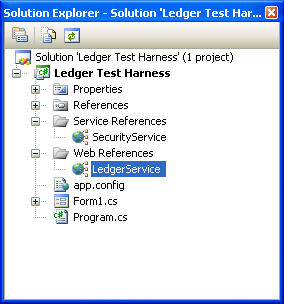
It was done this way to illustrate the consumption difference between the two, but you can add both as Web references.
-
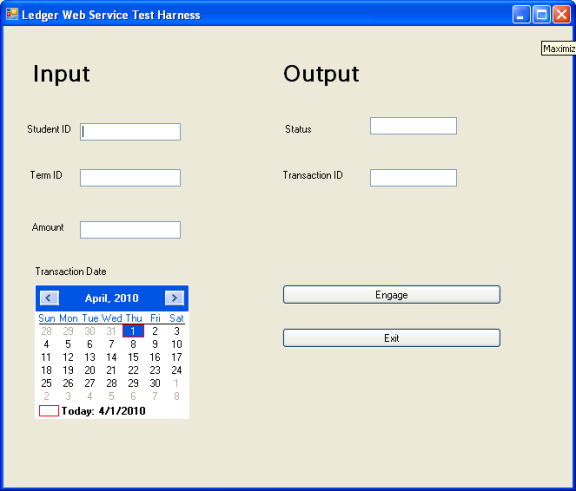
Specify a Student Id, Term Id, dollar Amount, and Transaction Date. Status is output to the status box, and if successful, will also output the Transaction Id for the SaTrans record inserted into the database.
-
The following code illustrates the consumption of the services, using both service and Web references. Follow the code and see the differences between the two consumptions.
using System;
using System.Collections.Generic;
using System.ComponentModel;
using System.Data;
using System.Drawing;
using System.Linq;
using System.Text;
using System.Windows.Forms;
using Ledger_Test_Harness.LedgerWebService;
using Ledger_Test_Harness.SecurityService;
namespace Ledger_Test_Harness
{
public partial class Form1 : Form
{
public Form1()
{
InitializeComponent();
}
private void txtExit_Click(object sender, EventArgs e)
{
Application.Exit();
}
private void btnEngage_Click(object sender, EventArgs e)
{
// Authentication logic - Notice that this is implemented as a service reference.
// Provide credentials
TokenRequest tokenRequest = new TokenRequest();
tokenRequest.UserName = "administrator";
tokenRequest.Password = "testing";
tokenRequest.TokenNeverExpires = true; // since we are testing only
// Instantiate service and token requests.
GetAuthorizationTokenRequest request = new GetAuthorizationTokenRequest();
request.TokenRequest = tokenRequest;
// Instantiate service and token responses.
TokenResponse tokenResponse = new TokenResponse();
GetAuthorizationTokenResponse response = new GetAuthorizationTokenResponse();
response.TokenResponse = tokenResponse;
// Instantiate the service
AuthenticationSoapClient service = new AuthenticationSoapClient();
// Access service, passing requests and response.
service.GetAuthorizationToken(request.RequestHeader, request.TokenRequest, out response.TokenResponse);
// Ledger service logic - Notice that this is implemented as a web reference.
// The consumption of the service is a little different
// than when implemented as a
// service reference.
// Instantiate the ledger request
PostLedgerRequest ledgerRequest = new PostLedgerRequest();
// Supply the authentication token received from above.
ledgerRequest.TokenId = response.TokenResponse.TokenId;
// Instantiate the message and add necessary properties
PaymentInMsg inMsg = new PaymentInMsg();
inMsg.StudentId = Int32.Parse(this.txtStudentId.Text);
inMsg.TermId = Int32.Parse(this.txtTermId.Text);
inMsg.TransactionDate = this.mCalendar.SelectionStart;
inMsg.Amount = Decimal.Parse(this.txtAmount.Text);
// Instantiate the inMsg array
ledgerRequest.Payments = new PaymentInMsg[1];
// Put the message in the payment request
ledgerRequest.Payments[0] = inMsg;
// Instantiate the response
PostLedgerResponse ledgerResponse = new PostLedgerResponse();
// Instantiate the service
LedgerWebService ledgerService = new LedgerWebService();
// Call the service
ledgerResponse = ledgerService.PostLedger(ledgerRequest);
// If result is OK, then display the transaction Id.
if (ledgerResponse.TrxResult == "OK")
this.txtTransId.Text = ledgerResponse.Payments[0].Id.ToString();
// Display the result
this.txtStatus.Text = ledgerResponse.TrxResult;
return;
}
}
}
-
If you create the form as shown above, copy and paste this code into the button click event to step through the code. Note that the authentication is an example to show its consumption and is not an example of how to implement in a production environment.
The other methods provided in this Web service are consumed in a similar manner.
