The Client Notification Web service provides a framework for receiving notifications of ‘Ready’ records in the Anthology Student database. The C# source code shows examples of how to receive and send messages from/to the Anthology APIs.
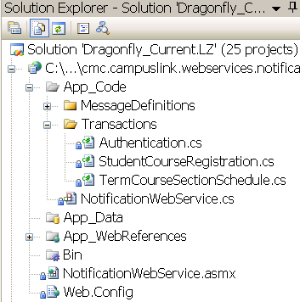
The NotificationWebService.cs file in the project above contains an orchestration for Authenticating, Getting data and Acknowledging the receipt of such data.
-
The
Authentication.csfile contains the code necessary for requesting and receiving a TokenId from the Authentication Web service. The method(s) in this class are called from the NotificationWebService orchestration. -
The
StudentCourseRegistration.csfile contains three methods.-
CreateMessages()This method iterates through the Notifications, extracts the information needed and creates/prepares an array of corresponding In-Messages.
-
Process()After the orchestration sends the requests to get the data, if will get a response. The Process method is called. This method contains a code ‘STUB’ where the client can add code to process the data.
-
CreateAcknowledgementMessages()After processing the data, the orchestration will call this method to create/prepare acknowledgment messages and send them to the AnthologyAPI’s.
-
-
The
TermCourseSectionSchedule.csfile contains three methods.-
CreateMessages()This method iterates through the Notifications, extracts the information needed and creates/prepares an array of corresponding In-Messages.
-
Process()After the orchestration sends the requests to get the data, if will get a response. The Process method is called. This method contains a code ‘STUB’ where the client can add code to process the data.
-
CreateAcknowledgementMessages()After processing the data, the orchestration will call this method to create/prepare acknowledgment messages and send them to the AnthologyAPI’s.
-
Additional Settings
The web.config file in the project above contains several settings that must be configured by the client.
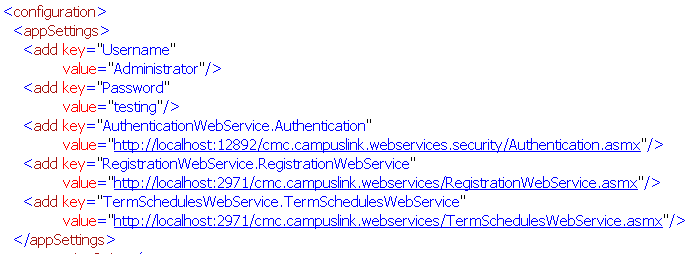
The username and password must exist in Anthology Student as an authorized user. Note that username and password are sent in clear text to the Authentication Web service. The client may want to use SSL to secure the authentication Web site.
The URL settings point to the corresponding API Web sites and Web services.
