Financial Aid Overview
The My Financial Aid > Financial Aid Overview option takes you to the Financial Aid Overview page or Financial Aid Offer page:
-
If you have a single enrollment, you will see the Financial Aid Offer page listing the financial aid details, such as cost of attendance, financial aid grants, and loans you are eligible for.
-
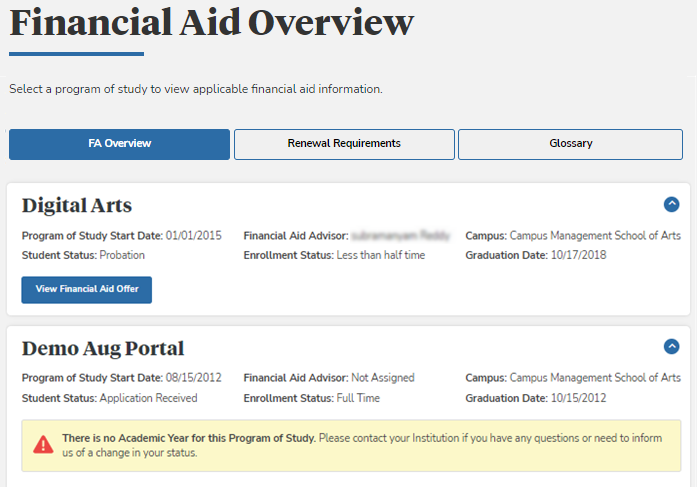
If you have multiple enrollments, you will see the Financial Aid Overview page. The FA Overview tab on this page shows the enrollments in sections that can be expanded (
 ) or collapsed (
 ).
).Each enrollment section has the following details:
- Program of Study Start Date
- Financial Aid Advisor (if assigned)
- Campus
- Student Status (for example, Attending, Application Received, Leave of Absence (LOA), Probation, etc.)
- Enrollment Status (for example, full-time, Less than half-time, etc.)
- Graduation Date
When the academic year for the enrolled program version is available in the institution's database, each enrollment section includes a View Financial Aid Offer button. Click the button to view a page that lists the financial aid funds you are eligible for (see Financial Aid Offer).
When the academic year is not available, the following message is displayed: “There is no Academic Year for this Program of Study. Please contact your institution if you have any questions or need to inform us of a change in your status.”