Financial Aid Estimate
Student Portal enables you to view and print a statement that depicts the estimated financial aid required for your educational expenses. To do so, you must enter your academic information, income, and tax details. The system uses the data to find a matching financial aid packaging method. Keep in mind that this a hypothetical aid estimator; it does not represent the approved financial aid packaging.
You can reselect any program and reenter income and tax information to obtain new estimates. The system does not save any financial aid estimates executed in Student Portal.
Institutions can configure the cost that is displayed online when a student selects a program on the Financial Aid Estimate page. The options are:
-
Show program cost — Displays the program cost configured under Financial Aid program lists. Set the field to true.
-
Show academic year cost — Displays the cost for the academic year. The system uses the budgets within Anthology Student to calculate academic year cost. Set the field to true.
-
Show no cost — Suppresses all cost information related to the program. Set both fields to false.
If the institution selects to display program cost information, this must be configured in Anthology Student. Otherwise, budget information must be configured to allow an academic year cost to be displayed online.
The financial aid packaging methods must be created in Anthology Student to accommodate level and dependency combinations that the student can select from Student Portal.
Estimate Your Financial Aid
-
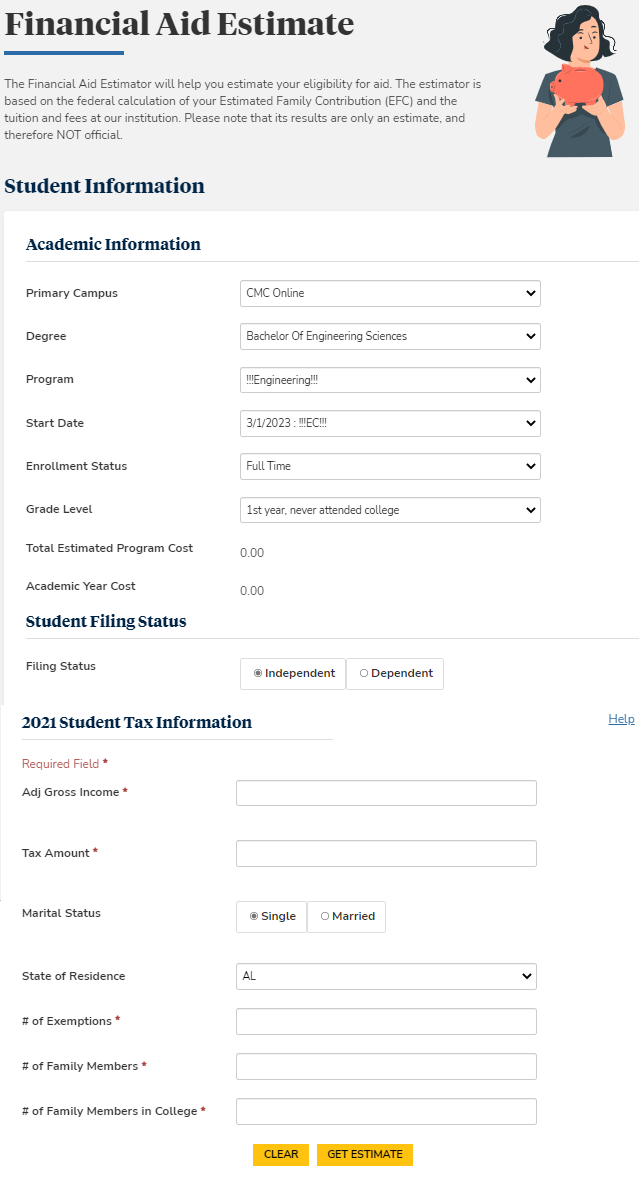
Navigate to Financial Aid > Financial Aid Estimate. The Financial Aid page is displayed. By default, the name of primary campus is displayed.
-
Specify your academic information. Select the following:
- Degree
- Program
- Start Date
- Enrollment Status
- Grade Level
-
Select your Filing Status.
-
Enter your Adjusted Gross Income and Tax Amount.
-
Click Help to view more information about the Tax Information fields. Click Clear to remove all your tax information from the Financial Aid page.
-
Select your Martial Status.
-
Select the state code for your State of Residence.
-
Click the GET ESTIMATE button. The estimated financial aid is displayed.
-
Click the CLEAR button to repeat the process.
