Configure Student Verification
The topic explains how to configure Student Verification for the integration with Anthology Student.
Authorizations in Student Verification
You must grant and verify authorizations to the system administrator:
-
Manage allowed domains
-
Manage file transfer setting
-
Manage current financial aid award year and ISIR correction
-
Add, edit, and delete campuses
-
Create and edit staff member accounts
-
Manage documents
Configurations in Student Verification
You must configure the following settings in Student Verification:
-
You must enable the Is Current option for the appropriate award year in Student Verification. (Select Administrators > Site Administration > select the Financial Aid Year Management link).
Action Location in Student Verification Enable the Is Current option for the appropriate award year Select Administrators > Site Administration > select Financial Aid Year Management > locate the award year Configure ISIR Correction Export (optional) Select Administrators > Site Administration > Ftp/Azure Export Configuration > locate the award year
-
Match the Campus Code and Ext. Code in Student Verification with the Code in Anthology Student when first creating a campus in Student Verification.
Field Name Product Name Location Campus Code or
Ext. CodeStudent Verification
Select Administrators > Campuses > Campus Description > General
Code Anthology Student Select Settings > System > select Campuses > General -
Enter the External Document ID in Student Verification based on the CmDocTypeID in Anthology Student.
Locate the External Document Id in Student Verification:
-
From the Home page, select Administrators.
-
Navigate to Document Administration.
-
Select Documents.
-
Select the document name.
-
In the Document Details page, locate the External Document Id.
Locate the CmDocTypeID of a document in Anthology Student:
-
Navigate to Configuration > Contact Manager > Documents.
-
Select the document Name.
-
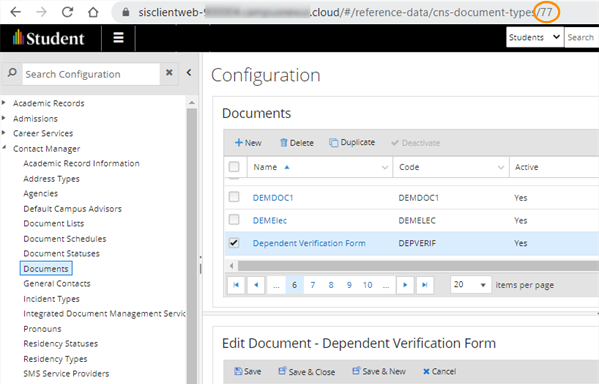
Locate the CmDocTypeID of the document in the URL as shown in the image below:
-
Additional Information
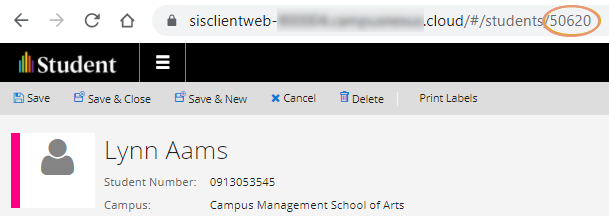
Do not change the value of the SIS Student ID populated in Student Verification as part of the integration. This value is the equivalent of the System ID for the student in Anthology Student. The System ID is available in the URL of the Student Profile page for a student.