Student Enrollment Period School Status Has Changed
Event: StudentEnrollmentPeriodSchoolStatusHasChanged
Topic: anth-stuenrperschstschg-stu-sbt-01
The StudentEnrollmentPeriodSchoolStatusHasChanged business event is raised in every place within the Anthology Student application where a saved unit of work includes a change to the school status on a student's enrollment period record. The business event has all the information related to student enrollment status changes. The event occurs upon initial enrollment and when the student's school status moves from Null/Applicant status to an Enrolled status within the system status categories.
The following related business events can also be raised:
- StudentEnrollmentPeriodSchoolStatusHasChanged ToActive
- StudentEnrollmentPeriodSchoolStatusHasChanged ToPermanentOut
- StudentEnrollmentPeriodSchoolStatusHasChanged ToNeverAttended
The StudentEnrollmentPeriodSchoolStatusHasChanged event will be raised for individual students, in batch processing, or within other processes that change student enrollment period statuses. These processes include:
- Academics – Student Status History
- Attendance Posting
- Course Registration
- Processes - Enrollment Transfers
- Processes - Student Status Changes
- Processes - Update Student Statuses
- SAP Processing
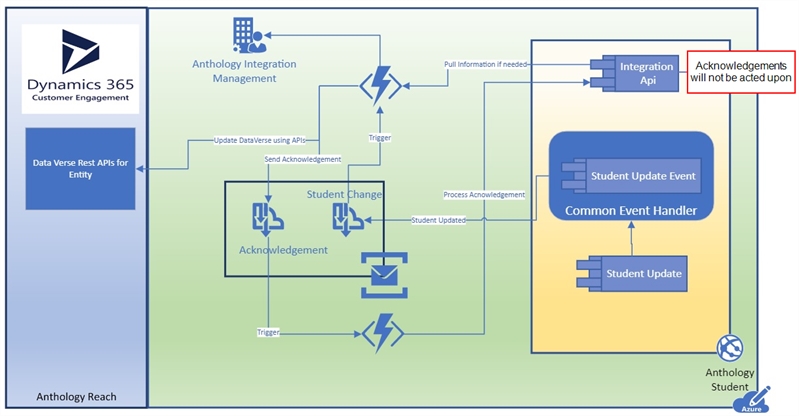
When the event is triggered, the following properties are pushed to the Azure Service Bus:
- School Status
- Enrollment ID
- Student ID
- Person ID
- School Status Change Reason
- New School Status
- Previous School Status
- Status Begin Date
- Status Change Status
- Effective Date
The event message is populated with the applicable data. The message includes properties that are commonly needed for all business events raised as well as properties that are specific to the context of the business event being raised. For these specific business events, the previous and new values of school status and system school status are included in the message. Other properties may be included as well.
Note: The event will not be triggered by acknowledgements.
Scenarios
The StudentEnrollmentPeriodSchoolStatusHasChanged event can occur in the following scenarios based on the enrollment status of a student with one enrollment or multiple enrollments defined by the AdEnrollID.
-
An initial enrollment is created. The student is enrolled into a program version.
-
A student is moved from one enrolled status to another enrolled status prior to starting classes. This would be a move from "being processed" to "cleared to register" and would change the status and remove registration holds placed upon the student so that they can enroll in classes.
-
A student is moved from an enrolled status to an active status. This means a move from a status in the Enrolled status category status to an Active status category status. This typically means the student has started at the institution for the first time.
-
A student is moved from an active status to a temporary out status. This means a move from a status in the Active status category status to a Temporary Out status category status. This typically means the student has stopped attending the institution due to an LOA (Leave of Absence) or SPN (Standard Period of NonEnrollment).
-
A student is moved from a temporary out to a permanent out status. This means a move from a status in the Temporary Out status category status to a Permanent Out status category status. This typically means the student has stopped attending the institution and did not return from an LOA or SPN.
-
A student is moved from an active or enrolled status to Never Attended (Permanent Out). This is a status category change and means the student did not start classes with the institution.
-
A student is moved from an active status to a graduate status. This is a move from an Active status category status to a Permanent Out status category status. This means the student has graduated from the enrollment and received a credential.
-
A student transfers from one enrollment to another. This means that the initial enrollment is placed in a permanent out (usually transfer to another program) and the new enrollment is placed into enrolled or active.
