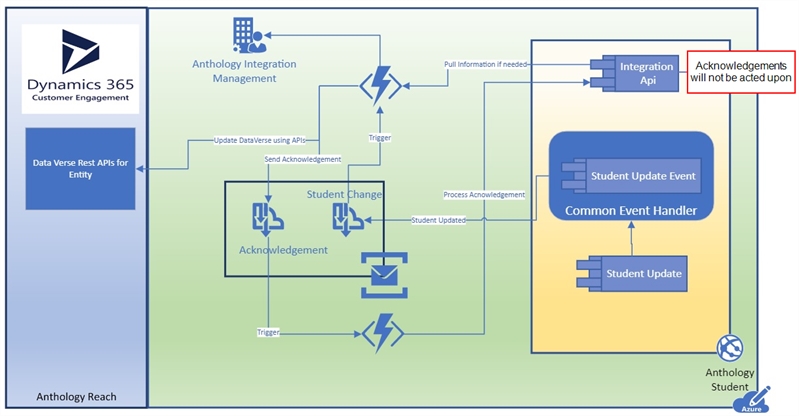
Document Status Has Changed
Event: DocumentStatusHasChanged
Topic: anth-....-stu-sbt-01
The DocumentStatusHasChanged business event is raised in every place within the Anthology Student application where a saved unit of work includes a change to the Status property on an existing or new instance of the Document entity for a student.
The DocumentStatusHasChanged event is raised for:
- Documents that are added within the application and enrollment process
- Documents that are tied to one enrollment or documents that are tied to all enrollments (all program versions)
- Documents whose statuses are changed manually within the individual student profile (Anthology Student > Contact Manager > Documents tile)
- Documents whose statuses are changed in Document Tracking (Anthology Student Home > Document Tracking tile)
- Documents whose statuses are changed via a workflow
The DocumentStatusHasChanged event can be raised from Anthology Student, Student Portal, Faculty Portal, and APIs.
When the event is triggered, the following properties are pushed to the Azure Service Bus:
- Student ID
- Enrollment ID (could be null for documents that are under All Program Versions)
- Person ID
- Term ID (could be null)
- Name
- ID
- Code
- Default Document Status
- Old Document Status
- New Document Status
- Original File Name
- Received Date (could be null)
- Approved Date (could be null)
- Award Year (could be null)
- Document Type
The event message is populated with the applicable data. The message includes properties that are commonly needed for all business events raised as well as properties that are specific to the context of the business event being raised. For these specific business events, the previous and new values of the document status are included in the message. Other properties may be included as well.
Note: The event will not be triggered by acknowledgements.