Integration Rules
Different products can represent the same data in different formats with different properties and details. The Business Rules Engine (BRE) defines the transformation rules (JSONata transformation logic) for data exchange between products. The JSONata empowered JSON payload transformation engine allows converting an entity (e.g., a User) from one serialized payload into a differently formatted serialized payload. The Integration Rules screen allows you to create rules that convert the data from one structure to another structure for the same entity.
The rules leverage the Enterprise Data Model (EDM), which defines the properties that commonly exist within the different products. For example, when Anthology Reach publishes a Contact, a Student is to be created in Anthology Student. Anthology Reach will publish the data in EDM, and the subscriber (that is, Anthology Student will retrieve the data in EDM, convert the data into the required destination structure, and save the data as part of the Student entity.
Every subscription will have at least one rule that uses the EDM for field mapping transformations between target and destination. Optionally, users can add rules to achieve specific goals (for example, duplicate checks or specific calculations) required by the subscription. The integration rules are used by the code and must be written in JSONata code.
The Integration Rules screen leverages the Integration Rules API endpoints.
Features
-
Validates Business Rules – Ensures rules correctly transform input data.
-
JSONata-based Transformations – Uses a powerful expression language for flexible data mapping
-
Real-time Testing – Allows running rules on sample data before deploying them.
-
Clear Comparison – Displays Input, Rule Logic, and Output side by side for easy debugging.
-
Optimized Data Processing – Ensures that integration rules extract only the required fields.
Screen Layout
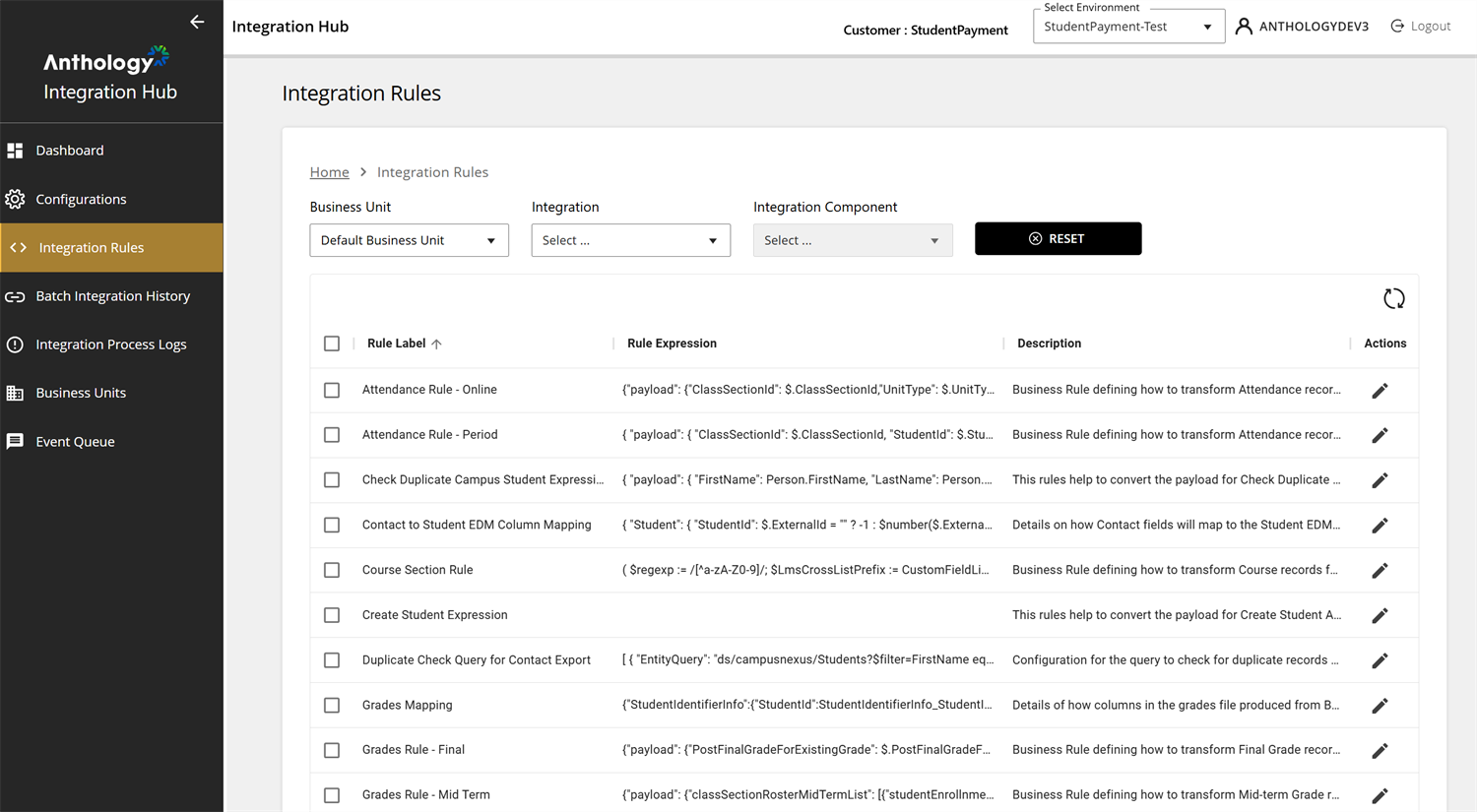
The Integration Rules grid provides an overview of the integration rules, displaying the following key columns:
-
Rule Label – Name of the business rule (e.g., Attendance Mapping, Grades Mapping).
-
Rule Expression – Displays the JSONata or structured logic that defines the rule.
-
Description – Provides additional details about what the rule does (e.g., defines how columns in the attendance file are mapped).
-
Actions Column:
-
Edit (
 ) – Allows modification of the rule.
-
Delete (
 ) – Provides an option to remove a rule.
-
How to Use It
Filter Integration Rules based on:
-
Business Unit – Drop-down to select a specific business unit (Default Business Unit is selected).
-
Integration – Drop-down to filter rules related to a specific integration.
-
Integration Component – Allows selection of an integration component.
-
Reset Button – Clears all selected filters.
-
Refresh Button – Reloads the rule list to fetch the latest updates.
Integration Rule Editor
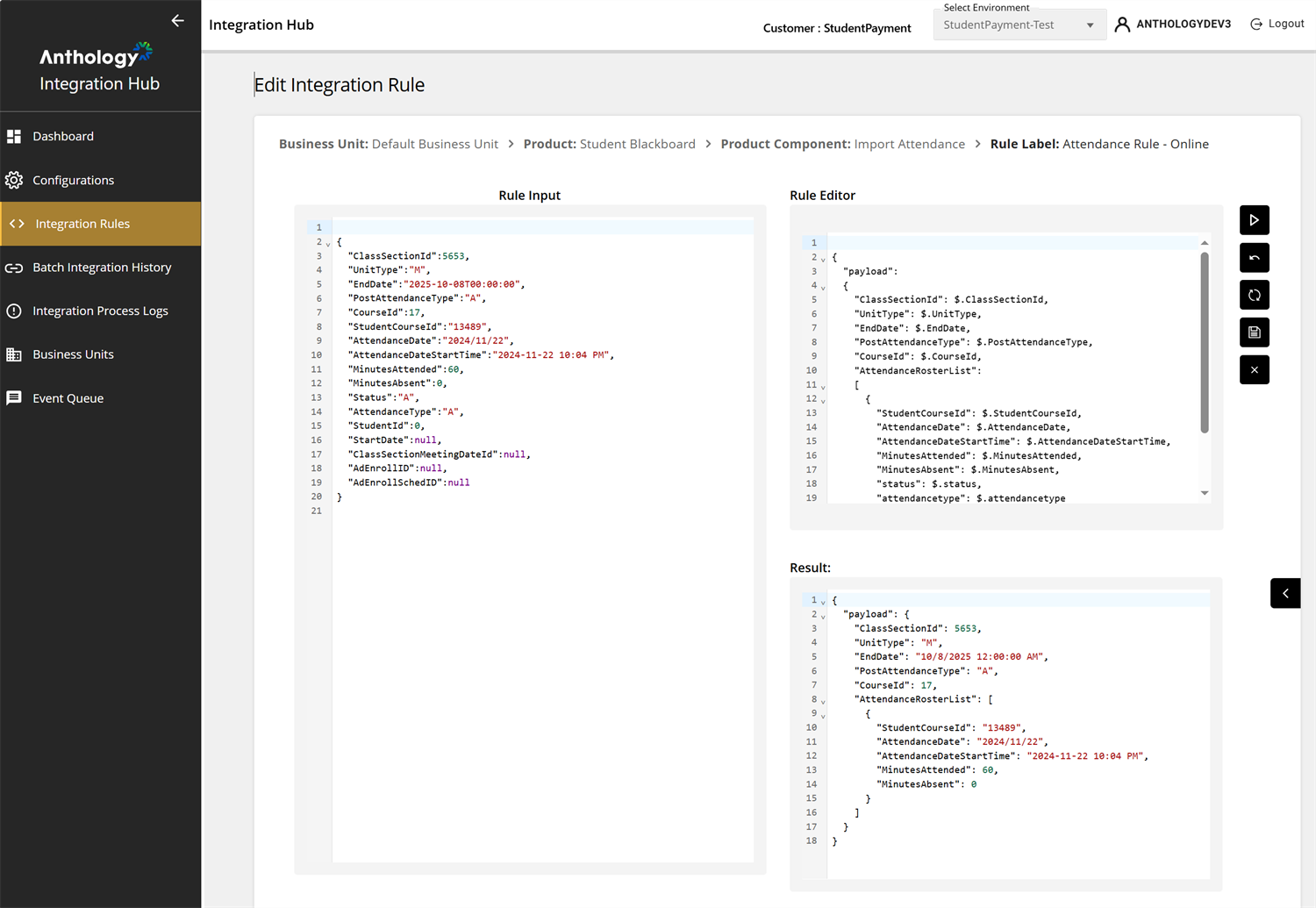
The Integration Rule Editor is used for testing and validating business rules by transforming input data based on predefined logic. The UI displays key contextual information:
-
Business Unit – Example: Default Business Unit is selected.
-
Product – Example: Anthology Student - Blackboard integration.
-
Product Component – Example: Import Grades.
-
Rule Label – Example: Grades Rule - Final.
The Rule Input panel:
-
Displays the raw input data that will be processed by the rule (read-only). The data is in JSON format and contains student grading information.
The Rule Editor panel:
-
Displays the JSONata transformation logic that defines how the rule modifies the input data. The rule extracts and restructures specific fields from the input JSON.
-
Example transformations:
-
Creating a payload object.
-
Mapping student details to a structured format.
-
Extracting and formatting grade-related attributes.
-
-
The Result panel:
-
Displays the transformed output after applying the rule to the input data (read-only). The structure of the output JSON follows the format defined in the Rule Editor.
-
Ensures that:
-
Only required fields are retained.
-
Data is formatted correctly.
-
Unnecessary attributes are removed.
-
The Integration Rule functionality operates using two key tables:
-
The IntegrationRuleTemplate table defines the default rules applicable to all integration processes.
-
The IntegrationRule table establishes associations between integration rule templates, customers, and environments while also supporting customizations specific to different use cases.
