Configurations
Anthology products will be deployed and integrated through the pipeline processes with default configurations. Staff members of the Anthology Professional Services team and customers will use the Configurations screen in the Integration Hub to review and edit the default configurations.
The configurations apply to environments (customers), business units (e.g., campuses of a customer), products (e.g., Anthology Student and Anthology Reach are considered one integration product), and product components (sub-processes within the products, such as processing Contacts, Courses, or Enrollments).
Configurations can be locked to created Anthology staff-only modifiable configurations. They can also be hidden to protect customer data, which should be secured from theft, such as a password or key material used to access a system’s resources.
The Configuration screen leverages the Configurations API endpoints.
Features
The Configurations screen provides:
-
Structured Filtering – Allows selecting relevant configurations for specific business units and integrations.
-
Security Compliance – Sensitive values (e.g., passwords) are masked to prevent unauthorized access.
-
Flexibility – Configurations can be edited or deleted directly from the UI.
-
API & JSON Support – Supports structured data formats for advanced configurations.
-
User Control – The UI allows the modification of key settings while maintaining security protocols.
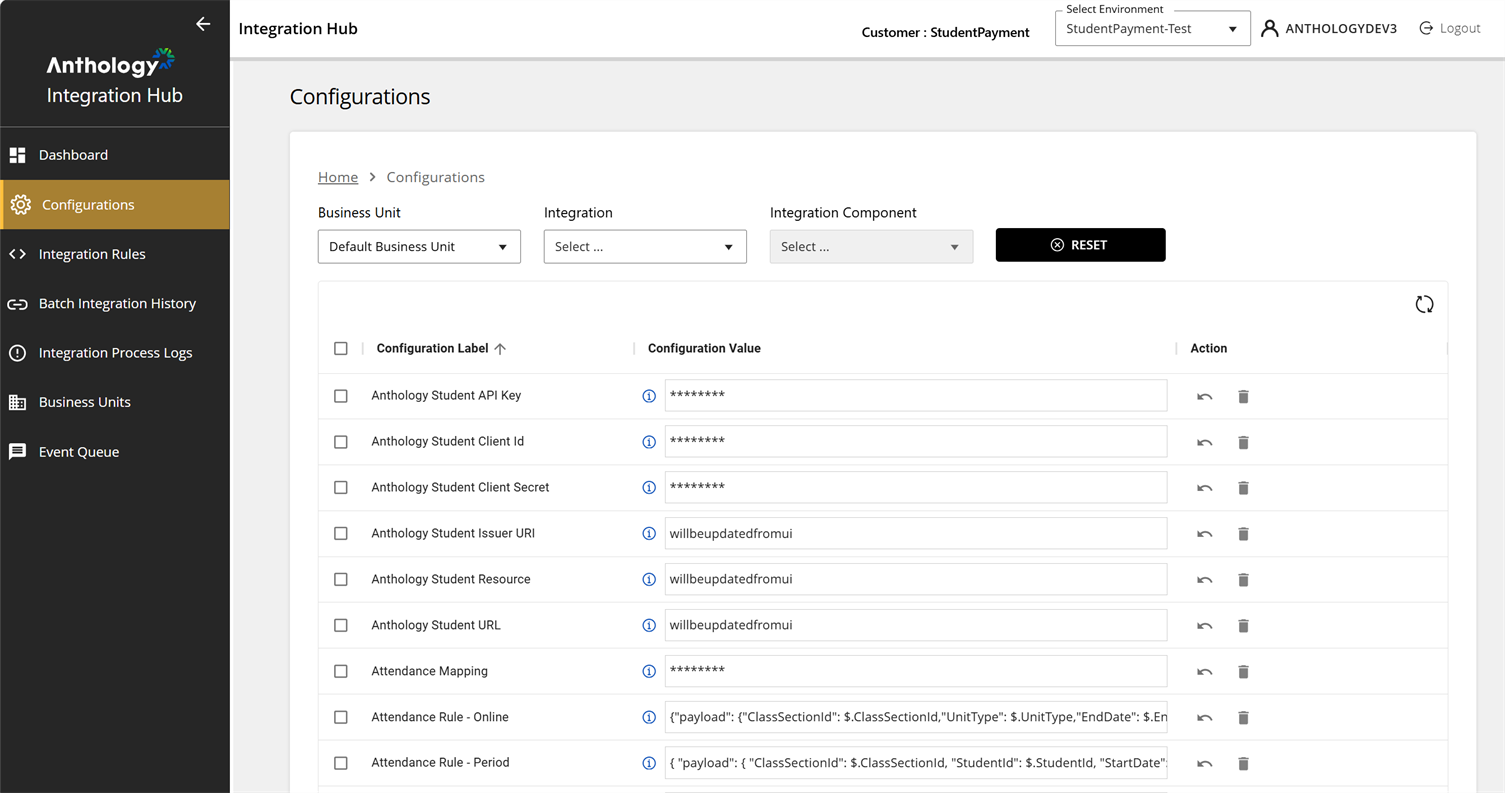
Screen Layout
This Configurations grid lists all configuration settings with the following key columns:
-
Configuration Label – Name of the configuration setting (e.g., Anthology Student API Key, Azure Storage Connection String).
-
Configuration Value – The corresponding value for each setting.
-
Sensitive values (e.g., API Keys, Client IDs, Secrets) are masked for security (displayed as asterisks ******).
-
Some values are URLs (e.g., Anthology Student URL).
-
JSON-like structures are used for complex configuration settings (e.g., Attendance Mapping).
-
-
Action Column:
-
Edit (
 ) – Allows modifying configuration values.
 -
Delete (
 ) – Removes the configuration.
-
Attributes of Specific Configuration Items
Some configuration items have specific attributes, such as:
-
Dynamic Updates – Some configuration values are labeled as "will be updated from UI", indicating they can be modified dynamically.
-
Security Measures – Sensitive information (such as API Keys and Secrets) is masked to prevent exposure.
-
JSON-based Configuration – Some configurations contain structured JSON data, indicating that complex rules or mappings are stored in a machine-readable format.
-
REST API Endpoints – Some configurations reference API endpoints (e.g., Blackboard - AddChildCourse API), suggesting integration with external services.
How to Use It
The Configuration screen provides filters to select the configuration settings based on:
-
Business Unit – Drop-down to select the applicable business unit (the default Business Unit is selected).
-
Integration – Drop-down to filter configurations for a specific integration.
-
Integration Component – Allows the selection of a specific component related to an integration.
-
Reset Button – Clears all selected filters.
