HTML Content is not Rendering on the Portal
Problem
After the Sitefinity page migration, the Description field on the Appointment Details and Booked Appointment Detail pages is not rendering HTML content correctly. HTML tags are displayed instead of formatted content (e.g., Teams meeting links appear as escaped text instead of click-able hyperlinks).
Solution
Force refresh the Description field's HTML rendering configuration for the Appointment Details and Booked Appointment Detail pages. To do so:
-
Log in to Sitefinity CMS as an administrator.
-
Navigate to Pages from the main menu.
-
Locate the Appointment Details page.
-
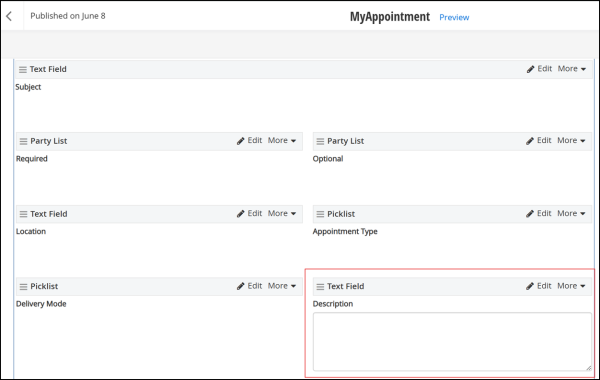
On the selected page, open the Edit Form widget that contains the Description field.
-
Click on the Description field to open its configuration panel.
-
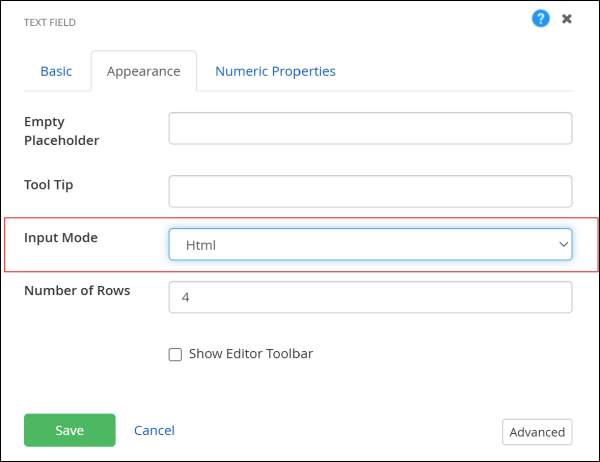
Select the Appearance tab and perform the following steps:
-
Change the Input Mode from HTML to Text.
-
Save the configurations.
-
Change the Input Mode from HTML to Text.
-
Save the configurations.
-
-
Locate the Booked Appointment Detail page and repeat steps 4 through 8.
-
Save the field changes.
-
Publish the form to apply the changes to the live site.
-
Verify the fix by opening an appointment record on the portal and confirming that the Description field renders HTML content correctly.
