Server Side Sync - Gmail Integration
When enabled the sync process provides for:
- Automated tracking of email sent by the user from Encoura Reach
- Users receiving new emails or replies to tracked emails in their personal mailbox.
- All user emails sent out of Encoura Reach that have sync enabled will be displayed as follows:
- In their Activities, sent Emails
- In the Activity history of all recipient records in Encoura Reach based on finding a match to the email address.
- In the Sent Items folder of the senders’ Gmail account.
- All emails sent by leads, contacts and accounts to a user in Encoura Reach will be tracked dependent on the user’s personal option settings:
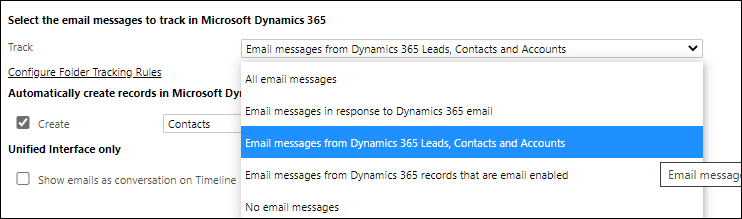
- When an email is received from a lead, contact or account, the email address will be the primary email address in the corresponding Encoura Reach record. All emails sent from a person or entity (lead, contact or account) will be tracked in Encoura Reach.
If the option Email messages in response to a Dynamics 365 email is set, the reply will not be tracked in Encoura Reach and will be available in the recipient’s Gmail inbox. - Emails sent from a user’s Gmail account (and not from Encoura Reach) will not be tracked to Encoura Reach. However, using the above setting, the recipient’s reply will be tracked in Encoura Reach.
- Deletion of Gmail and Encoura Reach Tracked emails – there is no connection between Gmail and Encoura Reach when email on one side is deleted.
