 See Also
This topic describes the behavior of the Properties of an Object that are associated with the Phone Format, SSN Format, or ZIP/Postal Code Format Properties of the Country Object.
When you type a value for the associated Property, the Set Formatted Value dialog box is automatically displayed. The Set Formatted Value dialog box is also displayed when you click  in the associated Property.
The following table describes the fields in the Set Formatted Value dialog box. It also describes the behavior of the messages that are displayed in the Status field of the Set Formatted Value dialog box.
|
Image |
Description |
|
|
|
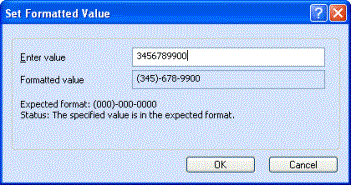
The specified value is in the expected format message indicates that the value you specified in the Enter value field conforms to the format indicated in the Expected Format field. Note: The specified value is in the expected format message will also be displayed in a scenario where you do not specify a value in the Enter value field. |
|
|
|
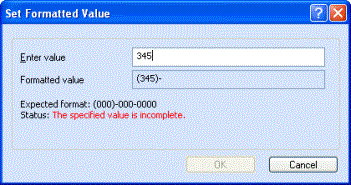
The specified value is incomplete message indicates that the value you specified is not complete. To view the The specified value is in the expected format message, specify a complete value in the Enter value field. |
|
|
|
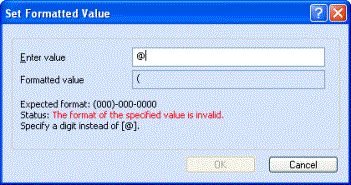
The Specify a digit instead of [<incorrect character>] message indicates that the value you specified is incorrect, where incorrect character is a character that does not match the expected format. A message at the bottom of the dialog box prompts you to modify the incorrect value specified in the Enter Value field. The specified value is in the expected format message is displayed when the value specified in the Enter value field conforms to the format indicated in the Expected Format field. |
|
|
Note • In a scenario where you continue to type values even after the The specified value is in the expected format message is displayed, the newly typed values will be accepted and values typed earlier will be removed in the order in which they were typed. • Press ALT + E to bring the focus of the cursor to the Enter value text box. |