Process Flow for Lead Stages and School Statuses
The following illustration describes the Stage and School Status management process in CampusNexus CRM and SIS.
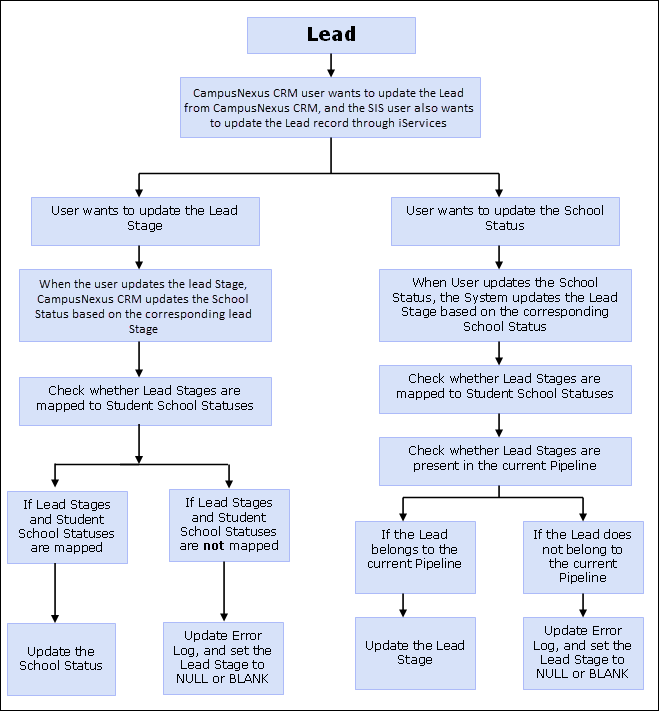
Process Flow for Stages and School Statuses
| Step | Description |
|---|---|
| Lead | Lead data is imported or created in CampusNexus CRM. |
| The Web Client user wants to update the Lead in CampusNexus CRM, and the SIS user wants to update the Lead through iServices. | The Web Client user updates Lead details in the system. Similarly the SIS user updates lead details through iServices. |
| The user wants to update the Lead Stages. | The user can update Lead Stages based on the lead’s progress in the admission lifecycle. . |
| When the Lead Stage is updated, the corresponding School Status is also updated. | The user can update Lead Stages as the Lead progresses through the admission lifecycle. The corresponding School Status is changed automatically by the system based on the Lead’s Stage value. |
| Check whether Lead Stages are mapped to Student School Statuses. | CampusNexus CRM checks whether Lead Stages are mapped to School Statuses. |
| If Lead Stages and Student School Statuses are mapped. | Lead Stages and School Statuses are updated. |
| If Lead Stages and Student School Statuses are not mapped. | The Error Log is updated, and sets the Stage value of the Lead to BLANK. |
| User manually updates the School Status. | Based on the Lead’s progress in the admission lifecycle, the user can update the School Status. |
| When the user updates the School Status, the CampusNexus CRM updates the corresponding Lead Stage. | The user can update School Status as the Lead progresses through the admission lifecycle. The corresponding Lead Stage is changed automatically by the system based on the School Status. |
| Check whether Lead Stages are mapped to Student School Statuses. | CampusNexus CRM checks whether Lead Stages are mapped to School Statuses. |
| Check whether Lead Stages are present in the current Pipeline. | CampusNexus CRM checks whether Lead Stages are present in the current Pipeline. |
| If the Lead belongs to the current Pipeline. | The Lead Stage is updated. |
| If the Lead does not belong to the current Pipeline. | The Error Log gets updated, and sets the Stage value of the Lead to BLANK. |