Configuration Tasks
When the installation of Connector Queue Manager is complete, two configuration files are created under the installation path. The configuration files are:
- QueueManagerConfiguration.config
- Web.config
Queues and administrator usernames and passwords settings are configured in the QueueManagerConfiguration.config file. Certain endpoint connections options for integration of Anthology Student and CampusNexus CRM are also configured in this file.
Additionally, you provide the web services URLs for integration of Anthology Student in the Web.config file.
You configure these files by opening them using an XML editor and providing appropriate values for the different options at the relevant sections.
Support for Queue Manager Custom Configuration
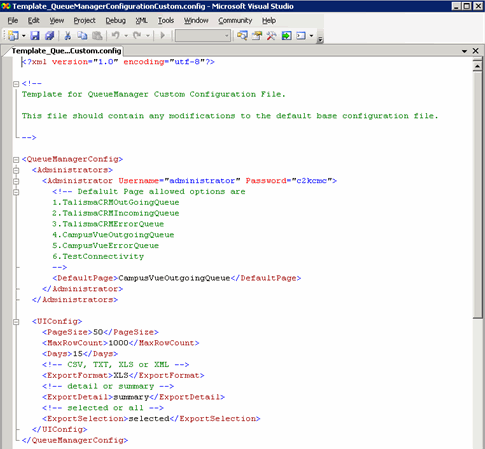
Queue Manager includes custom configuration files that the administrator can use to change the configuration of the Queue Manager. Modifying these files enables the administrator to safeguard the customizations during an upgrade of Connector.
The QueueManagerConfigurationCustomer.config file is available for customization. This is the customizable version of the file that is installed in the default installation location of the Queue Manager module. This file must be modified in the C:\Program Files\CMC\C2000\CampusVue Connector path.
When this file is installed, the name of the files is prefixed with the text "Template_". If the administrator wants to use the custom version of this files, the administrator must perform the following steps:
-
Copy the QueueManagerConfigurationCustomer.config file.
-
Remove the Template_ prefix from the file name.
-
Modify the file appropriately.
-
Save the file.
-
Restart the Service Manager Windows service.
An administrator can manually set a default landing page for each user in the QueueManagerConfigurationCustom.config file. When users log on to the Queue Manager, they can view the configured landing page. If a default landing page has not been configured or if the configured page is not one of the allowed options, a blank page becomes the default landing page. When a user is deleted, the user's landing page configuration is also deleted.
The following pages can be configured as landing pages:
- CampusVue Outgoing Queue
- CampusVue Error Queue
- Test Connectivity Page
- Talisma CRM Outgoing Queue
- Talisma CRM Incoming Queue
- Talisma CRM Error Queue