Test File Matching Criteria
You can use the Test File Matching Criteria page to specify the criteria that Anthology Student uses to automatically match students in the imported test score files to students in the Anthology Student database. Matched test scores are added to the Tests list for a student and are displayed when you select All Program Versions for their program version in the header of the Student Profile. (Select the Students tile > select the name in the Students list > expand Admissions > select the Test Scores tile.)
Anthology Student uses the information from the Student Profile when it tries to match the students in the Anthology Student database to the students in the test score file.
For a Test File to import correctly, it must include the student's First Name and Last Name, and the First Name and Last Name must be included in the File Layout.
Prerequisites
You must have:
-
To view the page, Admissions - Settings - View authorization
-
To configure settings, Admissions - Settings - Manage authorization
Access Method
Select the Settings tile > locate Admissions > select Test File Matching Criteria.
Procedure to Edit Items
-
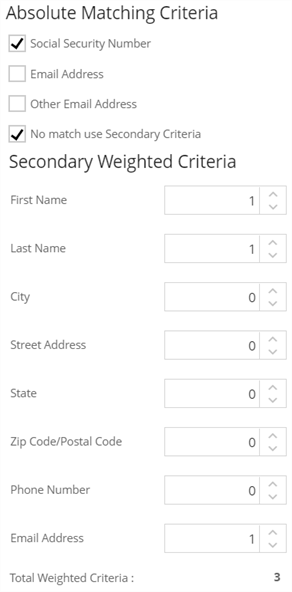
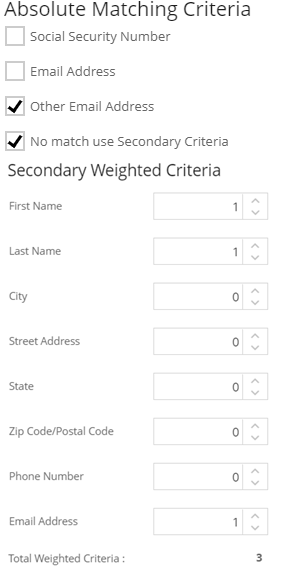
In the Absolute Matching Criteria, select the check boxes for the primary criteria you want Anthology Student to use.
If you select more than one check box, the students must match all the selected criteria. For example, if you select the Email Address and Other Email Address check boxes and:
-
Both the Email Address and Other Email Address matches, Anthology Student considers the students a match
-
The Email Address matches, but the Other Email Address does not, Anthology Student does not consider the students a match
-
-
If you want Anthology Student to try to match the students using secondary criteria when the students do not match the criteria selected for Absolute Matching Criteria:
-
Select the No match use Secondary Criteria
 check box
-
Specify any numeric value greater than 0 in the field for the criteria under Secondary Weighted Criteria
Anthology Student displays the Total Weighted Criteria
.
-
-
All 3 matches, Anthology Student considers the students a match
-
The Last Name and Email Address match, but the First Name does not, Anthology Student does not consider the students a match
-
Select Save to save the changes.
If you specify a value greater than 0 in more than one field, the student must match all the criteria with a value greater than 0. For example, if you specify 1 for First Name, Last Name, and Email Address and:
Examples of Both Sets of Criteria
The table shows examples that use both the sets of criteria for test file matching.
| Action You Want Anthology Student to Take | Example Values |
|---|---|
|
Check if the Social Security Numbers match.
|
|
|
Check if the Other Email Addresses match.
|
|