COD Jobs
You can create automated jobs for both COD Import and COD Export on the Automated Job Management form. You can also edit COD Import/Export jobs already configured and saved in Financial Aid Automation.
An automated COD Export job will create the COD Origination, Disbursement, and adjustment file(s). We recommend creating separate origination and disbursement COD Export Jobs for each fund. Title IV funds like Pell, Direct Loans, and TEACH should always be separated jobs and files to align with G5 downloads and institutional finance accounts to maintain a cleaner and more efficient reconciliation. In addition, it allows for a level loading of data providing a more streamlined execution:
- Pell
- Direct Loan Sub and Unsub
- Direct PLUS
- Direct Grad PLUS
- Direct Loan changes and identifier changes
- TEACH
The automated COD Import job uses files retrieved from the Student Aid Internet Gateway (SAIG) mailbox per Reporting Entity ID. The job may import promissory notes, accepted originations, disbursement files, and other Title IV files. This reduces the manual processes and eliminates the need to use the wizards.
 FAA COD Import – Best Practices for EDE Folder Management
Prerequisites
You must have:
-
Common - Configuration - View authorization
-
Financial Aid Automation – Configuration – Automated Job Management - Run Now and View authorization
-
Financial Aid Automation – Configuration – Automated Job Management - Job Sequence - New and Save authorization
-
Financial Aid Automation - Configuration - Automated Job Management - COD Export - Edit and New authorization
-
Financial Aid Automation - Configuration - Automated Job Management - COD Import - Edit and New authorization
Access Method
Jobs tab (Select the Configuration tile > expand Financial Aid > select Automated Job Management.)
Procedure to Add or Edit COD Jobs (Import/Export)
-
If you want to:
-
Add a new job, select the New Job button on the toolbar to open the New Job section
-
Edit an existing job, select the job link in the Name column to open that job in the Edit Job section
-
-
Specify or edit the following values based on the type of COD job (Import or Export).
COD Import Job
Staff Notification
Based on your selection in the Assignment Method field, either the Staff Groups or the Staff Member field appears.
Schedule
The Recurrence and Days fields only appear based on your selection in the Frequency field. You can configure the rotation of days using a Frequency of Daily. This allows you to configure a job to execute on the day specified under Days. The job will be executed and completed when the day and time occur. If you update the job schedule by changing the Start or End Date or the Days, the system creates new schedule entries and replaces the old schedule.
Notes about MPN information
Financial Aid Automation 9.0.0 and later provides the ability to store and display all MPNs linked to or associated with each loan on the student's Loan Information form on the MPN Information tab (refer to Loan Information).
For all Direct Loans for all award years and all records, Anthology Student displays:
- MPN Status
- MPN Expiration Date
- Fund Source Type
- MPN Link Indicator
- Borrower Name
- File Imported
- E-MPN
- Date Imported
- Award Year
In COMREC, CRWB, CRCS, and CRPN files, MPN information will be returned only when an award is originated (new MPN) or when the MPN Status or Expiration Date changes.
For the same loan and same MPN ID, the system does not add rows unless there is a change in:
- Expiration Date
- MPN Status
- MPN Link Indicator
When there is a change to any of these fields, the system adds a row to the
FaMpnInfo_RegulatoryandFaMpnInfoDetail_Regulatorytables. It does not override the existing MPN data, e.g.:<EMPNIndicator>true</EMPNIndicator> <MPNID>101074559M16G05346001</MPNID> <MPNStatusCode>P</MPNStatusCode> <MPNLinkIndicator>true</MPNLinkIndicator> <MPNExpirationDate>2025-04-11</MPNExpirationDate>
Institutions can override the MPN Status and MPN Expiration Date values in the UI (Student > Financial Aid > Awarding > Awards tab > Prom Note Info tab, refer to Edit or Cancel Direct Loans).
MPN Statuses During CRPN Import
Anthology Student's Automated COD Import handles Master Promissory Note (MPN) statuses during a System Generated Promissory Note file (CRPN) file import as outlined below. School financial aid administrators can use this functionality to ensure an Accepted MPN status is not inadvertently downgraded to Pending, Inactive, or Rejected during the import process.
Ensure your system administrator enables the Keep MPN Status Accepted feature flag. Navigate to Settings > System > General and set Keep MPN Status Accepted to Yes. When enabled, this setting prevents the system from overwriting an already Accepted MPN status.
With the feature flag enabled, the system automatically evaluates the current MPN status before applying updates from an incoming CRPN file.
-
Import a CRPN file for a student.
-
The system checks if the student's current MPN status is Accepted (A).
-
The system ignores incoming Pending (X), Inactive (I), Rejected (Z or R), or undefined statuses, retaining the original Accepted status.
Note: If the incoming status is also Accepted, the system updates the record normally, ensuring other fields like the expiration date and ID remain correct.
-
Navigate to the student's Direct Loan award form to review the MPN information and confirm the Accepted and Linked status remains intact.
Troubleshooting
Issue Solution MPN status updates to Pending after import Verify the Keep MPN Status Accepted setting is set to Yes. Navigate to Settings > System > General to confirm. Receiving exception CODEXPRT0053 or ELIGBLTY0086 This occurs if the MPN status was recently downgraded. Use Configuration > Financial Aid > Automated Job Management > Automated COD Import to manually restore the MPN information to Accepted and Linked. Notes about CRCS, CRSP, CRWB, and CREC files
The COD Import process in Financial Aid Automation 23.3.0 and later will store the values of the borrower's credit status response in the Anthology Student database. The values are extracted from the CRCS, CRSP, and CRWB files. When a Direct Parent PLUS loan is awarded to a student, a service will run to auto-match the awarded loan information. Users no longer need to identify the file for re-import or ask COD to send the same file.
The entrance/exit Counseling information (CREC) will also be captured and stored against the student so that when a student is enrolled, the service will identify the student and match the data accordingly.
The background jobs Clear Auto Match Credit Decision Date Expired Records and FAA Auto Match COD Details support this process (refer to Background for Scheduled Jobs in Anthology Student).
The following tags are saved as part of the import process for Direct Parent PLUS loan message classes (CRCS, CRSP, and CRWB). The process will update the borrower information so that on any further export, the updated borrower information will be sent to COD.
CRCS, CRSP, and CRWB Application ID – as in the incoming file
Application Sub Reason
Award Year
Borrower First Name
Borrower Last Name
Borrower Perm City
Borrower Perm State
Borrower SSN
Credit Appeal Status
Credit Balance
Credit Balance Option
Credit Decision Date
Credit Decision Override Code
Credit Decision Status
Credit Requirements Met
Date Acknowledged
Date Application Completed
Date Award Range Req Ended
Date Award Range Req Started
Date Credit Decision Expired
Date Imported
Date PLUS Counseling Completed
Date Processed
Default Overpay Code
Deferment Option
Document Status
Endorser Amount
Endorser Approved
Financial Award ID – as in the incoming file
Fund Source Code – DIRPLUS
Fund Source Description
Max Loan Amount
Max Loan Indicator
Message Class
Original Credit Decision Status
PLUS Counseling Complete
Previous Application ID
Relationship To Student
Response Code
Response Error Code
Response Error Field
Response Status
School Credit Balance Option
Six-Month Deferment Option
Student First Name
Student Last Name
Student SSN
Unknown Loan Amount
The following information will be saved in the Anthology Student database for the entrance/exit Counseling (CREC).
CREC Financial Award Year
Fund Source Code
Fund Source Description
Student First Name
Student Last Name
Student SSN
Counseling Complete Date
Counseling Sequence Number
Counseling Type
Any imported student files with a counseling type of "DLPEntranceCounseling" automatically update both the Grad Plus Counseling Date and the FA Entrance Interview Date based on the information within the file. This avoids any unnecessary ELIGBLTY0030 exceptions being generated because a disbursement evaluation for an unsubsidized loan failed due to a missing FA Entrance Interview Date.
When the Eligibility job is run for a student with multiple enrollments, the FA Entrance Counseling Date is first reviewed when evaluating both Subsidized and Unsubsidized Direct Loans. This date is then used across all those applicable enrollments for that student, avoiding any need to manually enter the date for newer enrollments where it is missing and the creation of the related ELIGBLTY0030 exception.
Currently, Anthology Student does not support DECFENOP files. Anthology Student relies on CRCS or CRSP files for the information on Endorser Approval or determining the Appeal Status.
Notes about Borrower Information from CRSP, CRWB, and CRCS files
When CRSP/CRWB/CRCS message classes files are imported using Automated COD Import, the borrower information will be updated to align with the Department of Education requirements. The Direct Parent PLUS loan is identified based on three entities: Borrower SSN, Borrower First Name, and Borrower DOB. The following fields will be updated if all three entities are matched to the loan.
- Borrower DOB
- Borrower Citizen
- Borrower Address
- Borrower Zip Code
- Borrower Phone
- Borrower Email
- Borrower Identifier
If a file does not contain any of the above fields, the existing value of those fields will be retained so that on further export, the loans will not be held up due to missing required borrower information.
The tags <IASG Eligible> and <CFH Eligible> have been added to the Pell Award response block. These tags are optional and valid for award years 2024-25 and later.
COD Export Job
COD Export Options
Number of days after the system date to include Scheduled and Ready to Pay Disbursements
Days to exclude in Actual Disbursement Date
Exclude Holidays
Exclude Weekends
Both check boxes can be selected simultaneously.
FAA COD Export will export the disbursements based on the calendar settings configured under Academic Records. Any scheduled disbursement dates that occur over the weekend or during a holiday (configured under Academic Records) will be excluded or included based on the selection made above.
If Exclude Weekends is selected, any scheduled disbursements that occur during a weekend will be excluded. The actual disbursement date will be updated to reflect the day following the weekend.
If Exclude Holidays is selected, any scheduled disbursements that occur during a holiday will be excluded. The actual disbursement date will be updated to reflect the day following the holiday.
When both field options are selected, then the first working day of the job run after the holiday/weekend is considered as the actual disbursement date.
Example:
The scheduled disbursement date is January 10th. A holiday is configured for Winter Break from December 10th through January 19th. The actual disbursement date will be updated to reflect January 20th if the exclude holiday flag is selected. If Exclude Holidays was not selected, the actual disbursement date would remain on January 10th.
The <EnrollmentIntensity> tag will be included in the disbursement block for Federal Pell Grant awards starting from the 2024-25 academic year. The value for this tag will be sourced from the Pell Disbursement and will reflect the Packaged EI from the award form.
It is important to store this tag at the time of export and to ensure that the same Enrollment Intensity (EI) is consistently used for any subsequent adjustment exports.
The Suffix tag is added for the 2024-25 award year and later. Although this tag is optional, Anthology Student sends it when the Suffix is found during export. This tag is stored at the time of import. No validation or exception is created, however, this tag is skipped when COD Export find this tag with invalid value and not as per COD Guidelines.
In FAA COD Export 2024-25, the First Name, Middle Initial, Postal Code, and Phone Number fields are enhanced to meet the requirements of the 2024–2025 COD Technical Reference.
Include Grant Administrative Relief
Include Loan Administrative Relief
Based on your selection in the Students field, the following results will occur:
-
If you select All Students, all students for that award year are exported.
-
If you select Individual Students, only the students who have a Direct Loan "Admin Relief" field checked on that fund source are exported.
-
If you select Student Group, only the students who have a Direct Loan "Admin Relief" field checked on that fund source and are in the student group configured for the job are exported.
Staff Notification
Based on your selection in the Assignment Method field, either the Staff Groups or the Staff Member field appears.
Schedule
The Recurrence and Days fields only appear based on your selection in the Frequency field. You can configure the rotation of days using a Frequency of Daily. This allows you to configure a job to execute on the day specified under Days. The job will be executed and completed when the day and time occur. If you update the job schedule by changing the Start or End Date or the Days, the system creates new schedule entries and replaces the old schedule.
Tip: If you try to create a job that is already saved with the same criteria, a duplicate job validation message is displayed. The message has links for each saved job. When you select any of the links, a new tab displays the job details for your review.
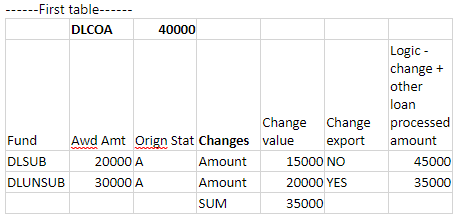
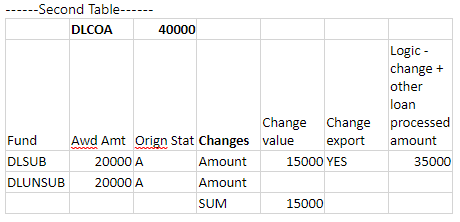
When the Direct Loan COA is reduced and the loan amounts for that loan period are also reduced to match the DLCOA, an exception is created for DLSUB since the change value of 15,000 plus the processed loan amount of 300,00 is more than the new DLCOA. However, DLUNSUB goes out (second table). When the process is rerun, the DLSUB is exported and the exception will be cleared. CODEXPRT0228 is created for all disbursements regardless of the disbursement status during Origination changes. Once this exception is resolved for the loan, the exception will be auto-cleared.
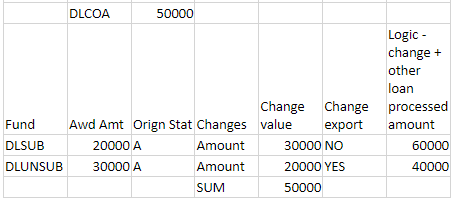
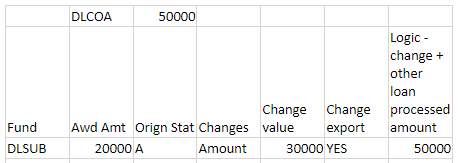
When the Direct Loan COA remains the same and there is a change in the Direct Loan accepted amount, though the change amount is within or equal to COA, the origination change export will create an exception for the first loan since it compares with the other loan accepted amount and that sum is more than the Direct Loan COA. On the subsequent run of the job, the exception for this loan will be resolved and auto-cleared with all changes exported to COD.
For the award years 2023-24 and later, COD added the following codes:
-
Student Eligibility Code 15 "Comprehensive Transition and Postsecondary (CTP) program"
-
Student Eligibility Code 03 "State Process with the required Ability to Benefit State Code and Ability to Benefit Completion Date"
Additionally, the new Ability to Benefit Test Code 13 "Texas Success Initiative (TSI) Assessment" was added and this will be applicable for Student Eligibility Codes 01 and 12. Institutions are required to update the Ability to Benefit (ATB) when incorrect ATB values are queued for export for the award year 2023-24 and generate the CODEXPRT0066 exception. This also applies when multiple award years are selected in the job management COD Export as this requires only one ATB code to be selected which should match the COD guidelines of the award year.
Based on the 2025-26 COD Technical Reference, the states of California and Iowa have been added to the list of ATB State Process Codes. The new states are available for selection and export for all award years.
-
If you want to save and:
-
Continue making changes, select the Save button
-
Continue to add another item to the list, select the Save & New button
-
Close, select the Save & Close button
-
