Gross up Payment Generation
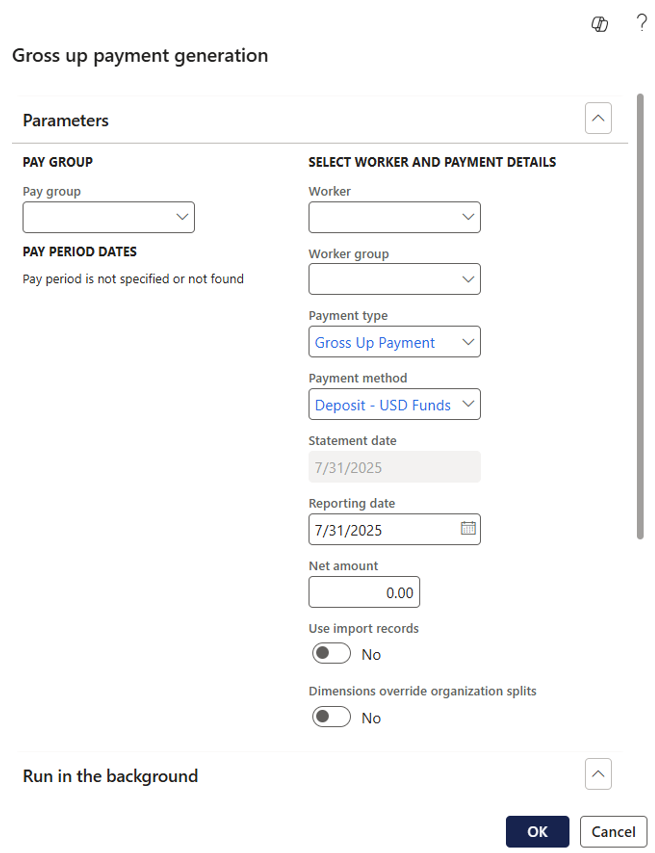
Accessed from:
- Journals > Gross up payments > Gross up payment generation
- Common > Anthology Payroll workers list > worker > AthPay Transactions tab > Transactions section > Create Gross Up Payments
Description
This function allows you to generate gross up payments (net payments after deductions) for a worker group or a worker.
This function can be run in the background as a batch process.
Fields
| Field | Description |
|---|---|
| Pay group | Select the pay group to generate gross up payments for |
| Pay period dates | Current pay period dates. Read-only. |
| Worker | Specify a single worker to receive the Net amount |
| Worker group | Specify a worker group to receive the Net amount |
| Payment type | Type of payment for which to generate gross up payments |
| Payment method | Payment method of the manual payment (i.e., check or direct deposit) |
| Statement date | Date the pay statement is issued to the worker |
| Reporting date | Date the payment is reported to the tax authority |
| Net amount | The amount to be paid to the worker or worker group after calculating taxes and deductions on the payment |
| Use import records | Select to use imported gross up target amounts for the current pay period instead of the specified Net amount. This method is the only way to issue gross up payments of differing amounts to multiple workers. |
| Dimensions override organization splits | Select to use the dimension values from the time transactions instead of applying any organization splits defined at the worker or position level. |
