Earning Groups
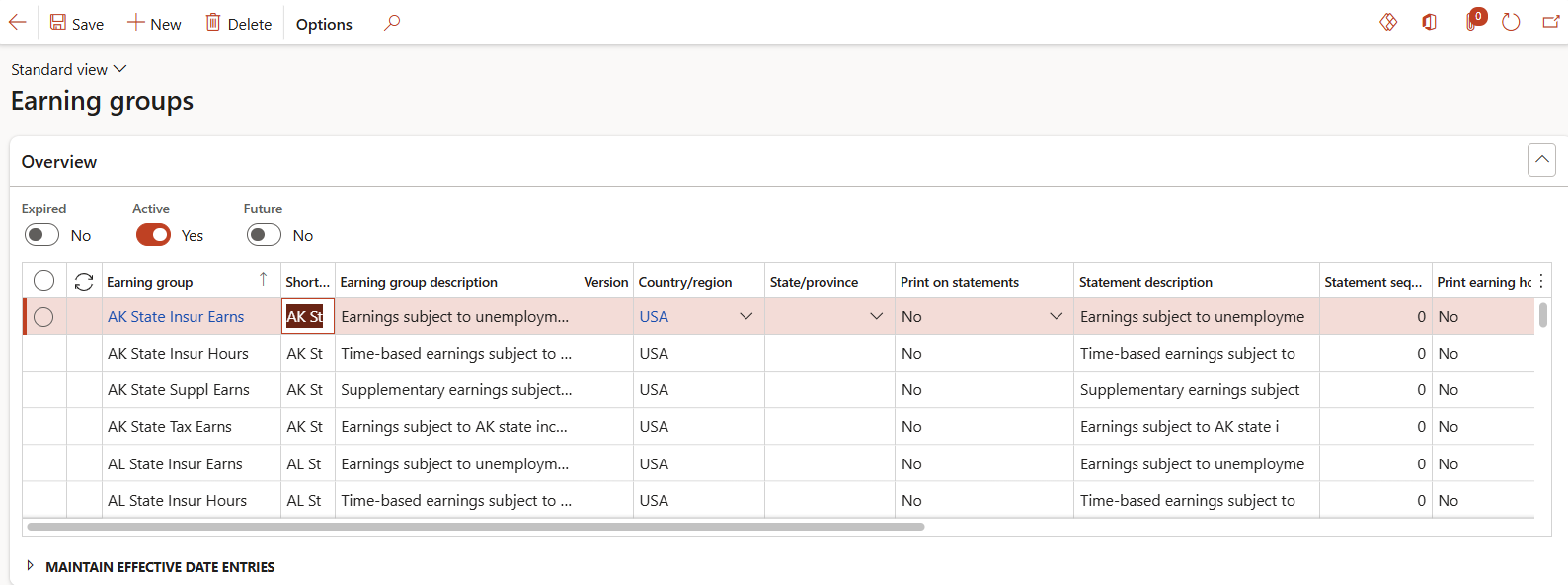
Accessed from:
- Setup > Tables > Earnings > Earning groups
Description
This form shows all earning groups configured for use in a particular company. Groups help to simplify certain aspects of data maintenance.
Earnings can also be added to groups in the Earning group earnings form.
Additional Tabs
| Tab | Tab Functions |
|---|---|
| Earning group earnings | Add/remove earnings to/from an earning group |
Fields
| Field | Description |
|---|---|
| Earning group | Name of the earning group |
| Short code | 5-character identifier. Defaults to the first five characters of the name. |
| Earning group description | Long description of the earning group |
| Print on statements | Yes to allow the earning group to appear on pay statements. No, otherwise. |
| Statement description | Description of the earning group that appears on pay statements |
| Statement sequence | List order of the group on pay statements. Lower numbers are higher priority. This number is not unique. |
| Print earning hours/units | Yes to allow the total hours/units of all earnings in the group to appear on pay statements. No, otherwise. |
| Print earning rates | Yes to allow the rates of all earnings in the group to appear on pay statements. No, otherwise. |
| Print earning rates on different lines | Yes to put different earning rates on separate lines if Print earning rates is Yes. No, otherwise. |
| Active date | First date the record is in effect. |
| Expiry date | Last date the record is in effect. |
