Benefit/Deductions
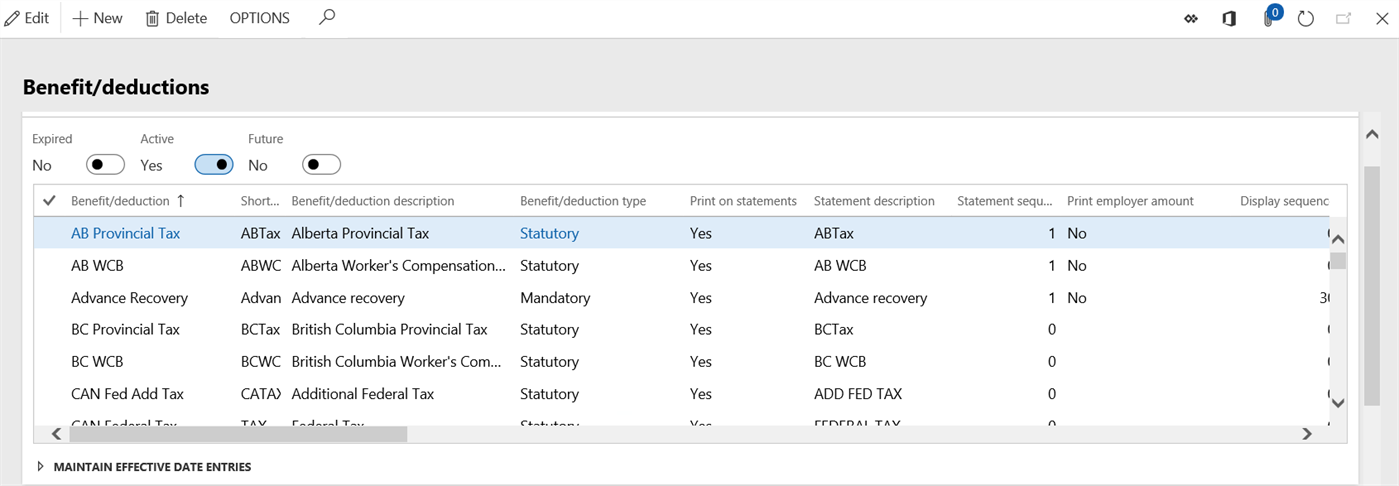
Accessed from:
- Setup > Tables > Benefit/deductions > Benefit/deductions
Description
This form shows all benefit/deductions configured for use in a particular company. The benefit/deduction code controls accounting information for transaction postings as well as how the benefit/deduction handles negative net scenarios.
Some benefit/deductions contain version numbers, which means they were imported from a Statutory Deduction Spreadsheet from the software provider. These benefit/deductions cannot be modified apart from accounting and display options.
Additional Tabs
| Tab | Tab Functions |
|---|---|
| Benefit/deduction enrollment selections | Add/remove enrollments to/from a benefit/deduction code |
Fields
| Field | Description |
|---|---|
| Benefit/deduction | Name of the benefit/deduction code |
| Short code | 5-character identifier. Defaults to the first five characters of the name. |
| Benefit/deduction description | Long description of the benefit/deduction |
| Version | Version number for benefit/deductions that are managed by the software provider. Benefit/deductions with version numbers cannot be modified. |
| Country/region | Jurisdictional information, if applicable |
| State/province | |
| Benefit/deduction type | Optional type classification for reporting purposes |
| Calculation sequence | Sequence number for determining order of calculation during pay processing as some benefit/deductions rely on the results of others. Lower sequence numbers are calculated first. This field should be set accordingly if the benefit/deduction relies on a calculation that references an accumulator. |
| Depletion sequence | Sequence number for determining order of deduction from gross pay. For example, garnishments are taken before taxes which are taken before voluntary benefits. Lower sequence numbers are deducted first. |
| Benefit/deduction sequence | Associate this benefit/deduction code with a benefit/deduction sequence, for determining order of depletion at a finer detail or on a worker-by-worker basis |
| Insufficient funds | How the benefit/deduction behaves when gross pay is less than the deduction:
|
| Prepaid allowed | Yes to indicate that workers can prepay the benefit/deduction. No, otherwise. |
| Benefit | Yes to print the benefit/deduction in the Benefit section of the pay statement. No to print it in the Deductions section. |
| Apportion | Yes to reduce the benefit/deduction amount according to time worked during a pay period where the worker did not work for the full pay period (e.g., hired, terminated). No, otherwise. |
| Apportion by state | Indicates if the benefit/deduction is to be apportioned based on the states the worker works in for multi-state tax calculations |
| Self-service | Yes to allow workers to maintain their own calculation variables that are used in calculation of this benefit/deduction. No, otherwise. If Yes, must be used in conjunction with Self-service benefit/deduction calculation variables. |
| Date period type | Date when the benefit/deduction is calculated each pay period:
|
| Display sequence | Numerical order in which the benefit/deduction appears on reports. Lower numbers display first. |
| Garnishments | Indicates if the benefit/deduction is used for worker garnishments |
| Print on statements | Yes to allow the benefit/deduction to appear on pay statements. No, otherwise. |
| Statement description | Description of the benefit/deduction that appears on pay statements |
| Statement sequence | List order of the benefit/deduction on pay statements. Lower numbers are higher priority. This number is not unique. |
| Print employer amount | Yes to allow the employer contribution to appear on pay statements, for benefit/deductions with both a worker and employer amount. No, otherwise. |
| DR employer ledger account | Debit and credit ledger accounts in GL to which employer amounts are posted |
| CR employer ledger account | |
| Employer AP vendor | AP vendor code to which employer amounts are posted |
| Employer apportioning basis | By default, it is All Earnings. Change it according to the benefit/deduction. |
| Earnings for employer apportioning | Earnings to choose if apportioning is for Selected Earnings. |
| DR worker ledger account | Debit and credit ledger accounts in GL to which worker amounts are posted |
| CR worker ledger account | |
| Worker AP vendor | AP vendor code to which worker amounts are posted |
| Worker apportioning basis | By default, it is All Earnings. Change it according to the benefit/deduction. |
| Earnings for worker apportioning | Earnings to choose if apportioning is for Selected Earnings. |
| Used by worker |
Yes to denote that this benefit/deduction is typically assigned at the worker level. No, otherwise. If the benefit/deduction is assigned at a level that violates this guideline, a warning message is generated, but the assignment is not prohibited. |
| Default worker enrollment | Default enrollment to set when the benefit/deduction is assigned at the worker level |
| Used by worker position |
Yes to denote that this benefit/deduction is typically assigned at the position level. No, otherwise. If the benefit/deduction is assigned at a level that violates this guideline, a warning message is generated, but the assignment is not prohibited. |
| Default worker position enrollment | Default enrollment to set when the benefit/deduction is assigned at the position level |
| Active date | First date the record is in effect |
| Expiry date | Last date the record is in effect |
